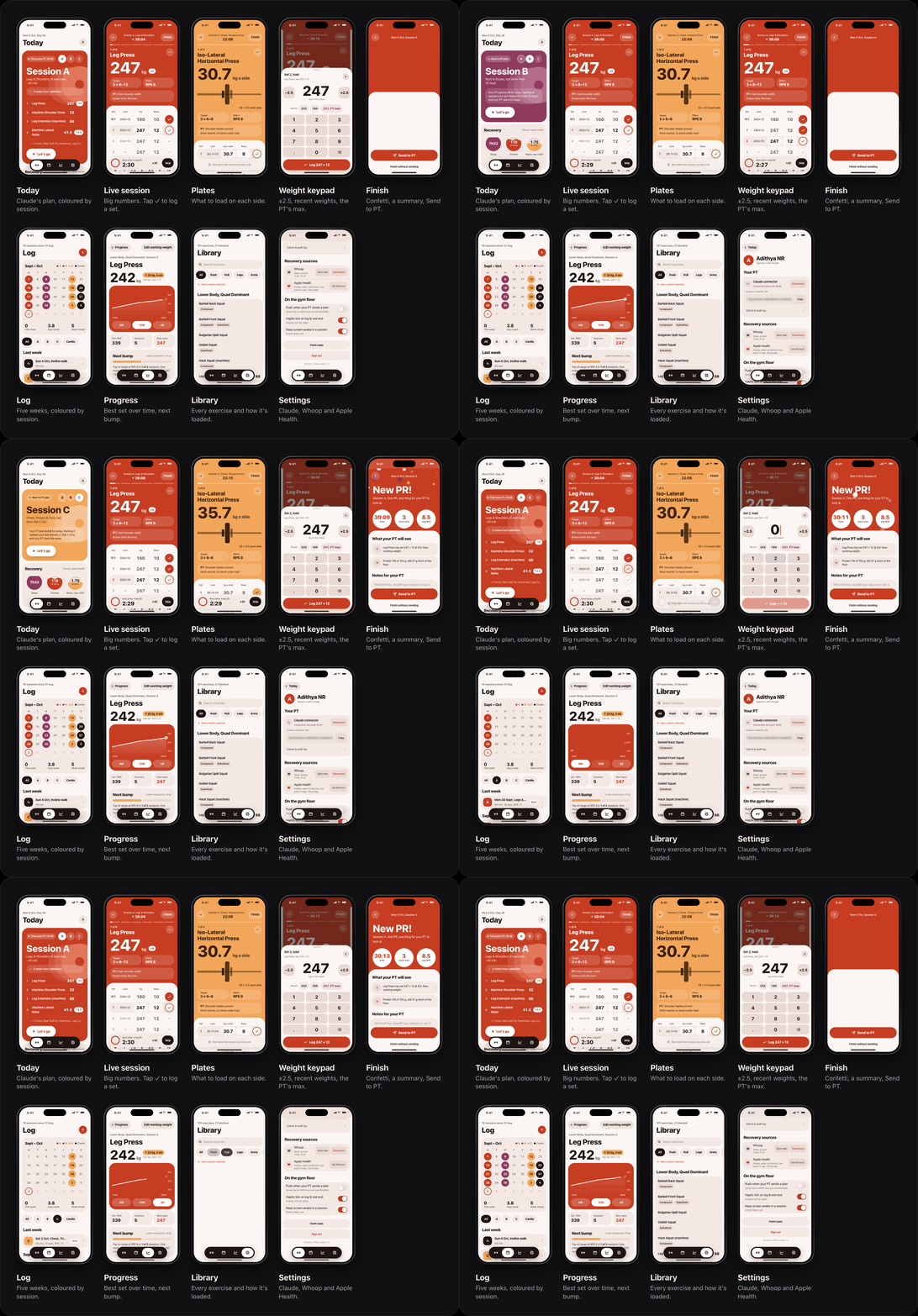
Olympus is a workout log I built for myself, and Claude is my personal trainer inside it. Claude reads my past sessions, my sleep and my injuries through an MCP server, plans the next session, and sends it to the app once I say yes. I train from the Today screen, log each set with one tap, and press Send to PT (my claude personal trainer project) when I'm done. Then Claude looks at what I actually did and plans the next one.
It's a Next.js 15 app that installs on my phone as a PWA. It uses Postgres on Neon with Drizzle, an MCP server with its own OAuth login, Whoop and Apple Health for sleep and nutrition, and an offline queue so I can log sets without signal. I designed the app too, so I'll cover both the design and the code behind it.
Why I Built This
I already had a Claude project set up as my trainer. It knows my DEXA scan results, my blood tests, my past workouts, my diet preferences and more, so the planning side worked well. Getting data in and out of it was the hard part. After every session I had to tell Claude what weights I lifted, how much protein and water I'd had and how I slept, then copy its plan into Obsidian and type every set in by hand at the gym. Doing all of that through a chat window was too much work.
The first version of Olympus, back in April, was a simple set logger with a basic MCP server. It worked, but Claude still had to guess a lot. It didn't know that the number on the iso-lateral press is per side, or that on the assisted pull-up a lower number is harder. It once planned a superset I'd been told to stop doing. The data was in the app, but nothing stopped a bad plan from getting in.
So I rebuilt it. The app holds all the data, and Claude reads and writes to it through a fixed set of tools. The server checks every plan Claude sends before saving it.
How It Works
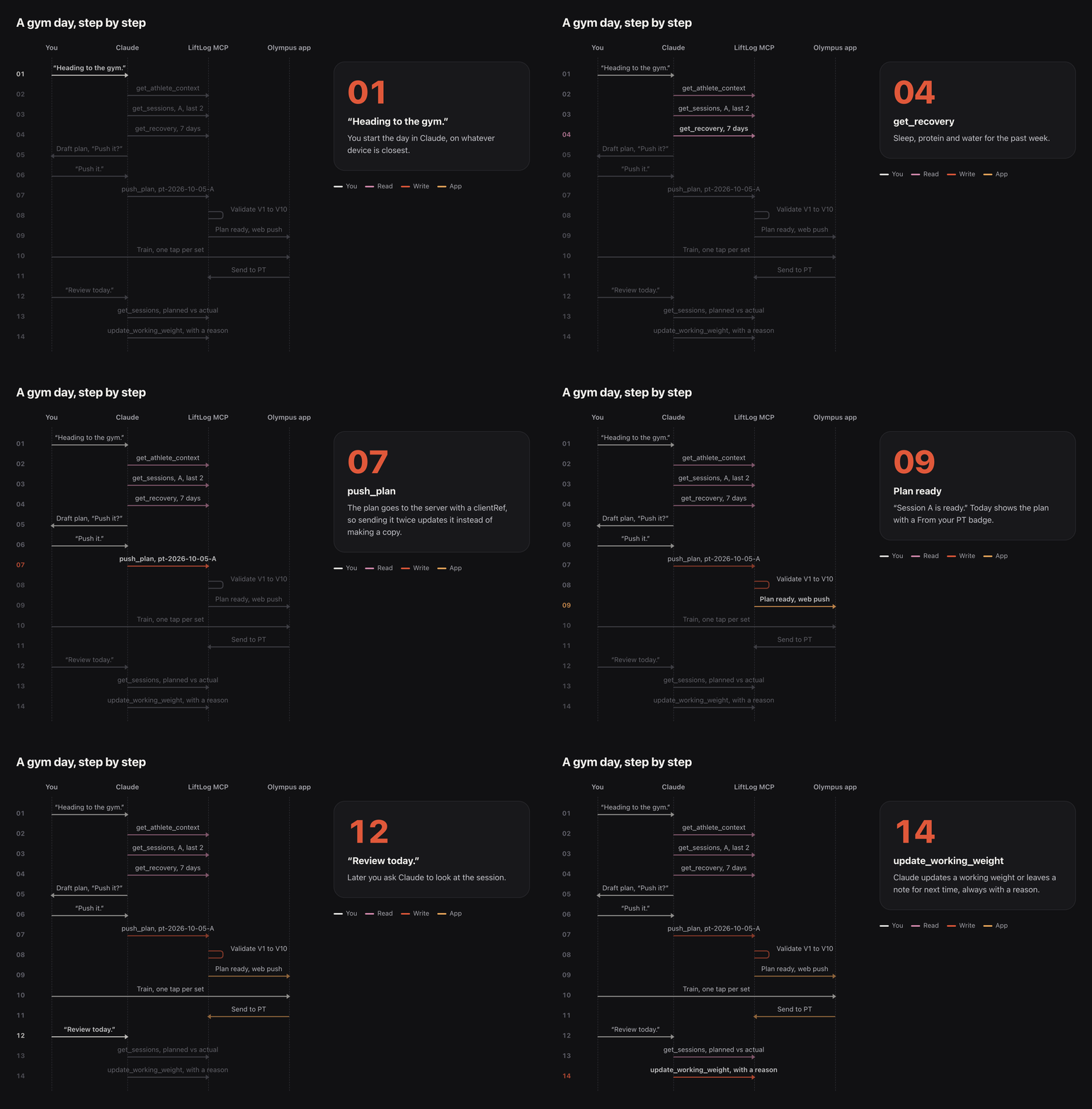
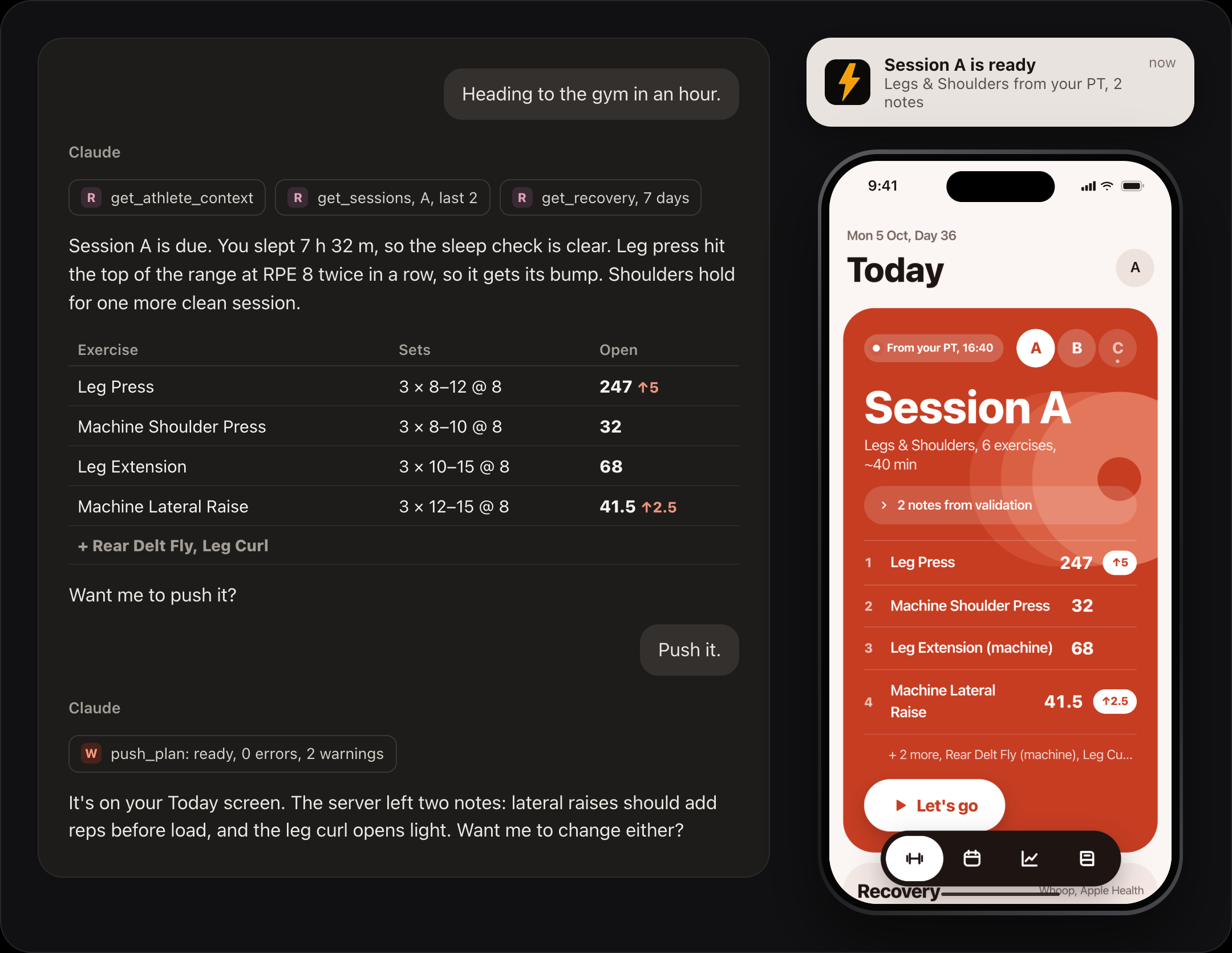
Here's a normal gym day. I tell Claude I'm heading to the gym. It reads my profile, my last two sessions of the type that's due, and my sleep for the week. It shows me the plan as a table and waits. I say yes, and it calls push_plan. The plan shows up on the Today screen with a "From your PT" badge, and I get a notification. I train, log my sets, and press Send to PT at the end. Later I ask Claude to review the session, and it updates my working weights or leaves a note for next time.
The Architecture
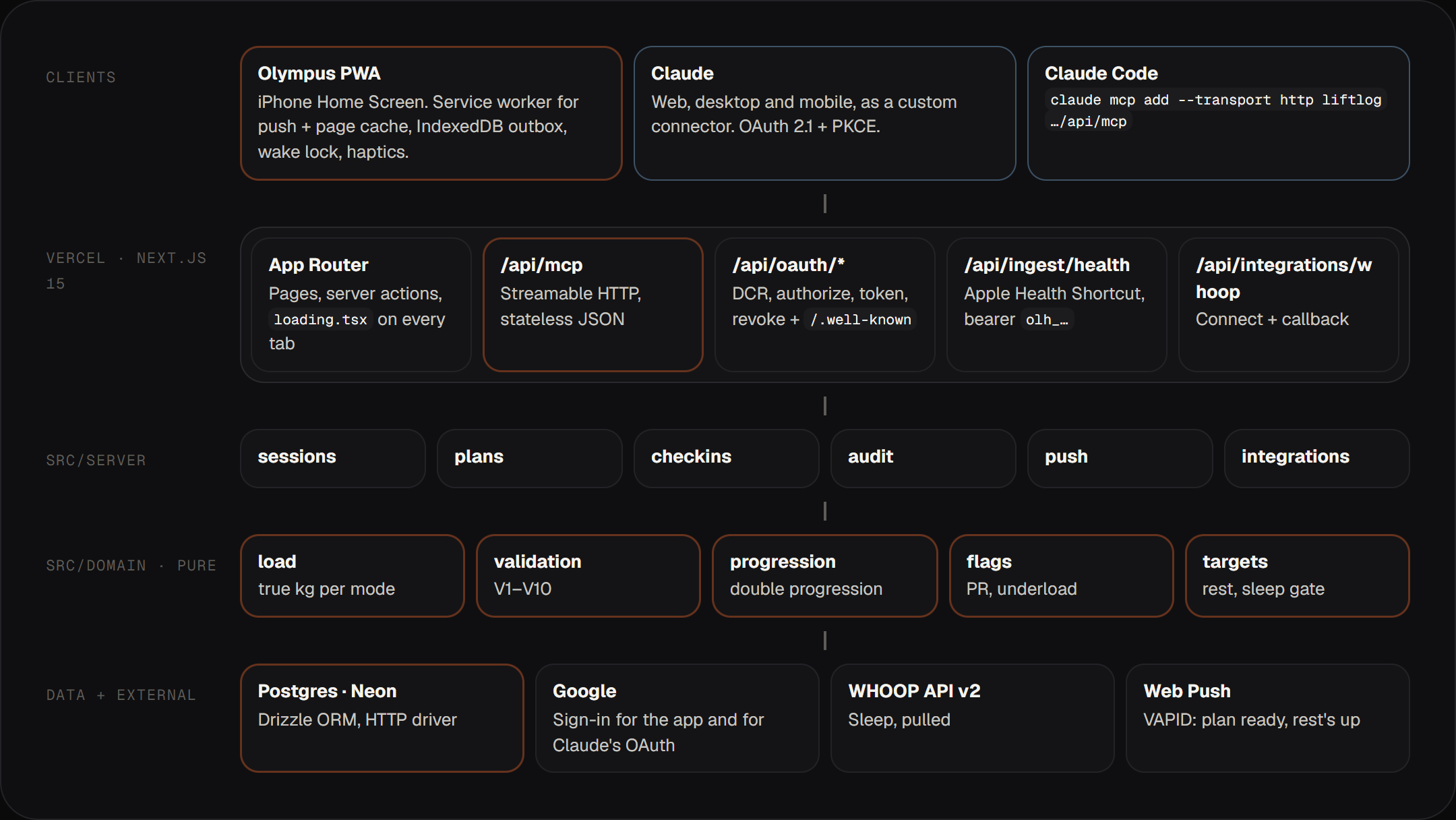
It's one Next.js app on Vercel with two kinds of users: me on my iPhone, and Claude. The app's server actions and the MCP server both call the same service layer in src/server, which calls the same functions in src/domain. So a set I log in the app and a session Claude logs through log_session go through the exact same code.
The src/domain folder has one rule: nothing in it can import the database, Next.js or React. It's plain TypeScript. That makes it easy to test, and it also let me import my old workout history using the same code that handles a live set.
The MCP Server
The server has twelve tools. Five read data, seven write data, and none of them delete anything. Claude can create plans, log sessions, update weights and leave notes, but if something needs deleting, I do it in the app. That one decision means I never have to worry about Claude removing a session by mistake.
Every tool returns JSON with a short summary line, so Claude has something simple to read back to me without repeating the whole response. Writes are safe to retry. push_plan takes a clientRef like pt-2026-10-04-A, and if Claude sends the same plan twice, or I ask it to change something, it updates the existing plan instead of creating a second one.
Every call is saved to an mcp_audit_log table with the tool name, whether it read or wrote, whether it worked, and what it sent. The Settings screen shows this log, so I can always see what Claude changed and when.
The server uses the Streamable HTTP transport in stateless mode. Each request creates a fresh server, with no open connections or session IDs to keep track of, so it runs on Vercel like any other API route. If a request comes in without a token, the server returns a 401 with a header that tells Claude where to log in.
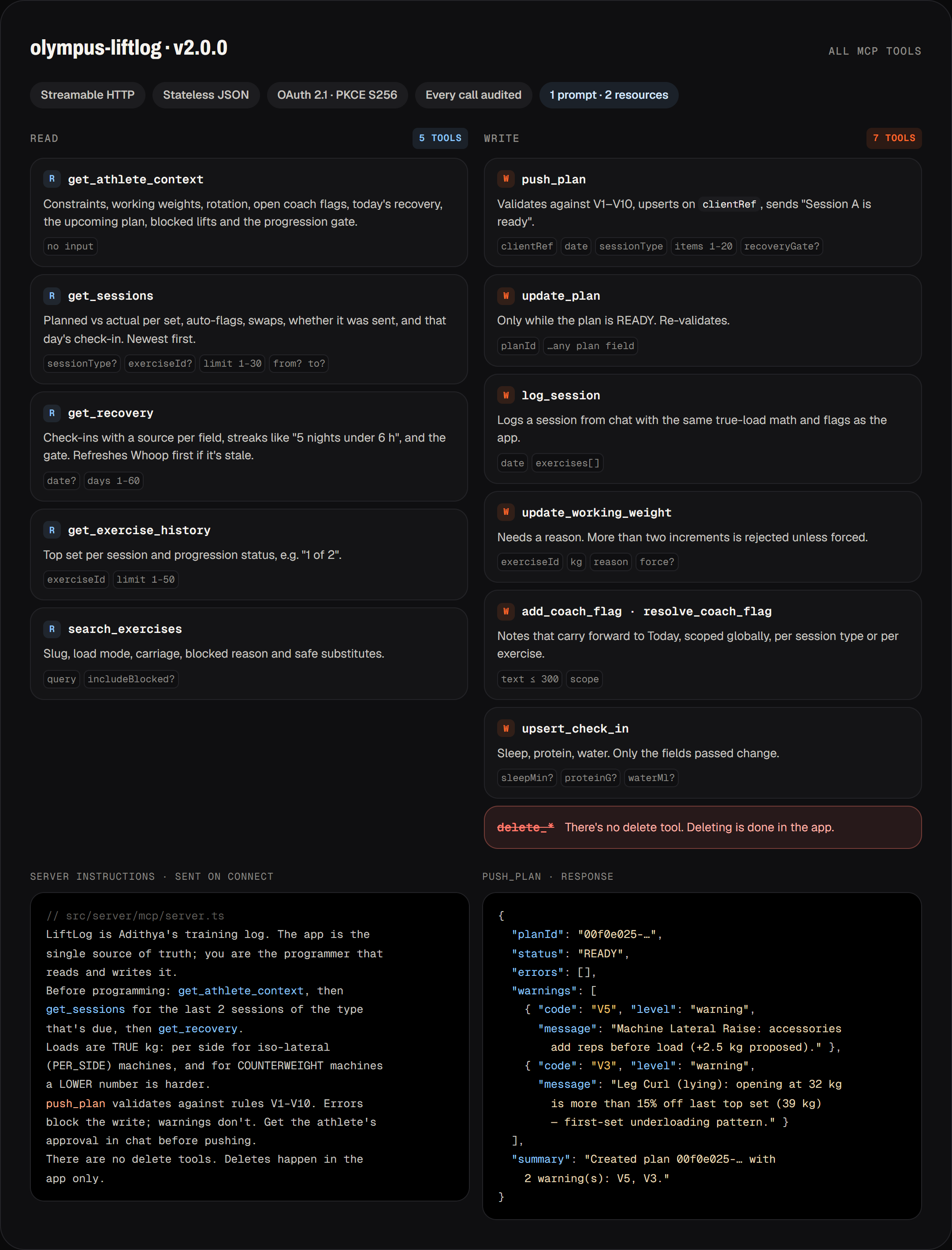
The server also has one prompt, programme_next_session, which walks Claude through planning a session in seven steps. And it has two resources that export my whole log in the same format as my old Obsidian notes.
Plan Validation
Every plan Claude sends through push_plan is checked against ten rules before it's saved. There are two levels. Errors stop the plan from being saved and go back to Claude so it can fix them. Warnings don't stop anything, but they're saved with the plan and show up on the Today screen as "2 notes from validation", so I see them even if Claude doesn't mention them.
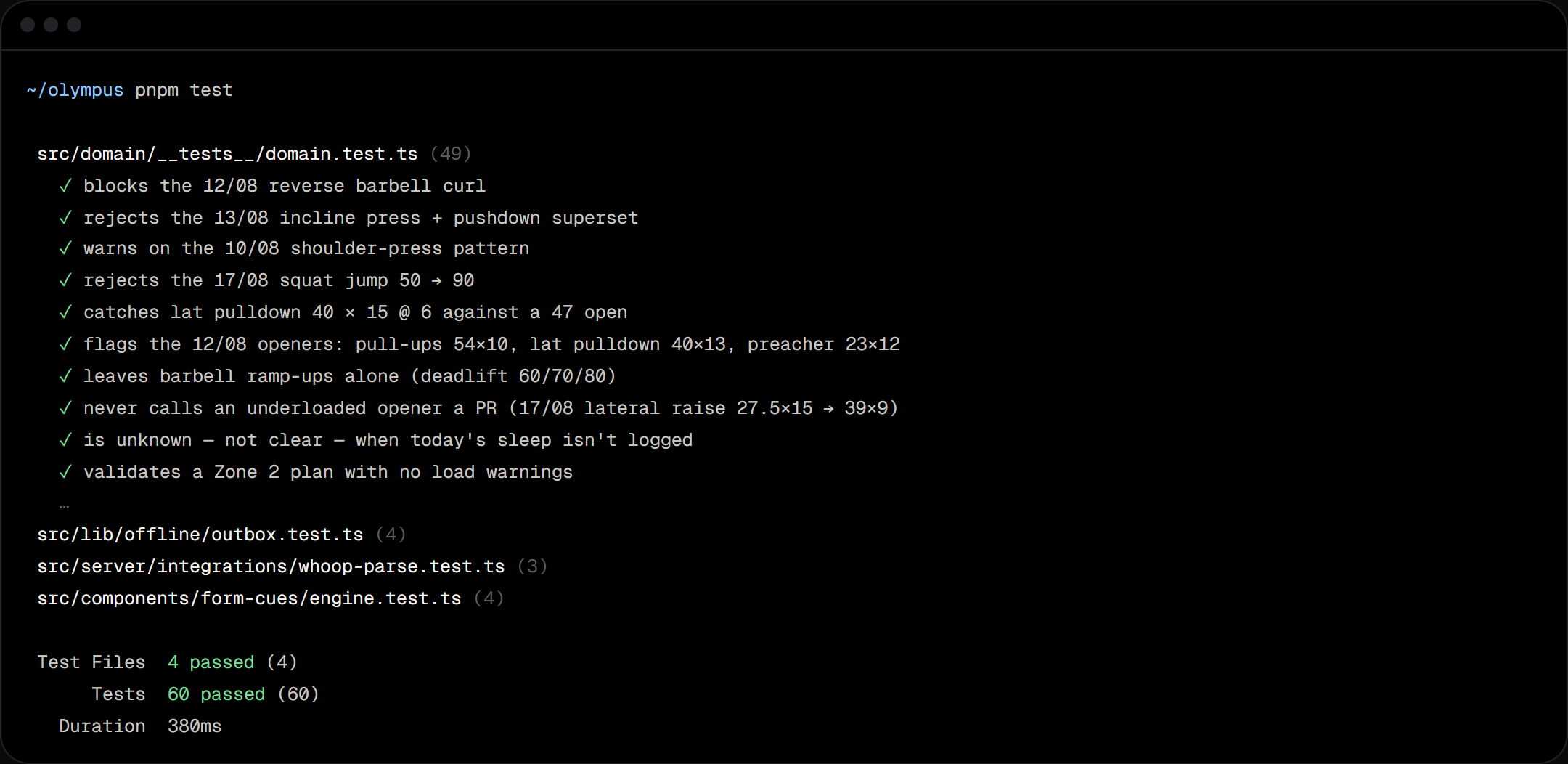
Most of these rules came from real mistakes. On 12/08, Claude planned a reverse barbell curl even though my wrist can't handle it. On 13/08, it put incline press and triceps pushdowns in the same superset. On 17/08, a machine squat jumped from 50 to 90 kg in one go. Each of these became a rule, and each rule has a test named after the date it happened.
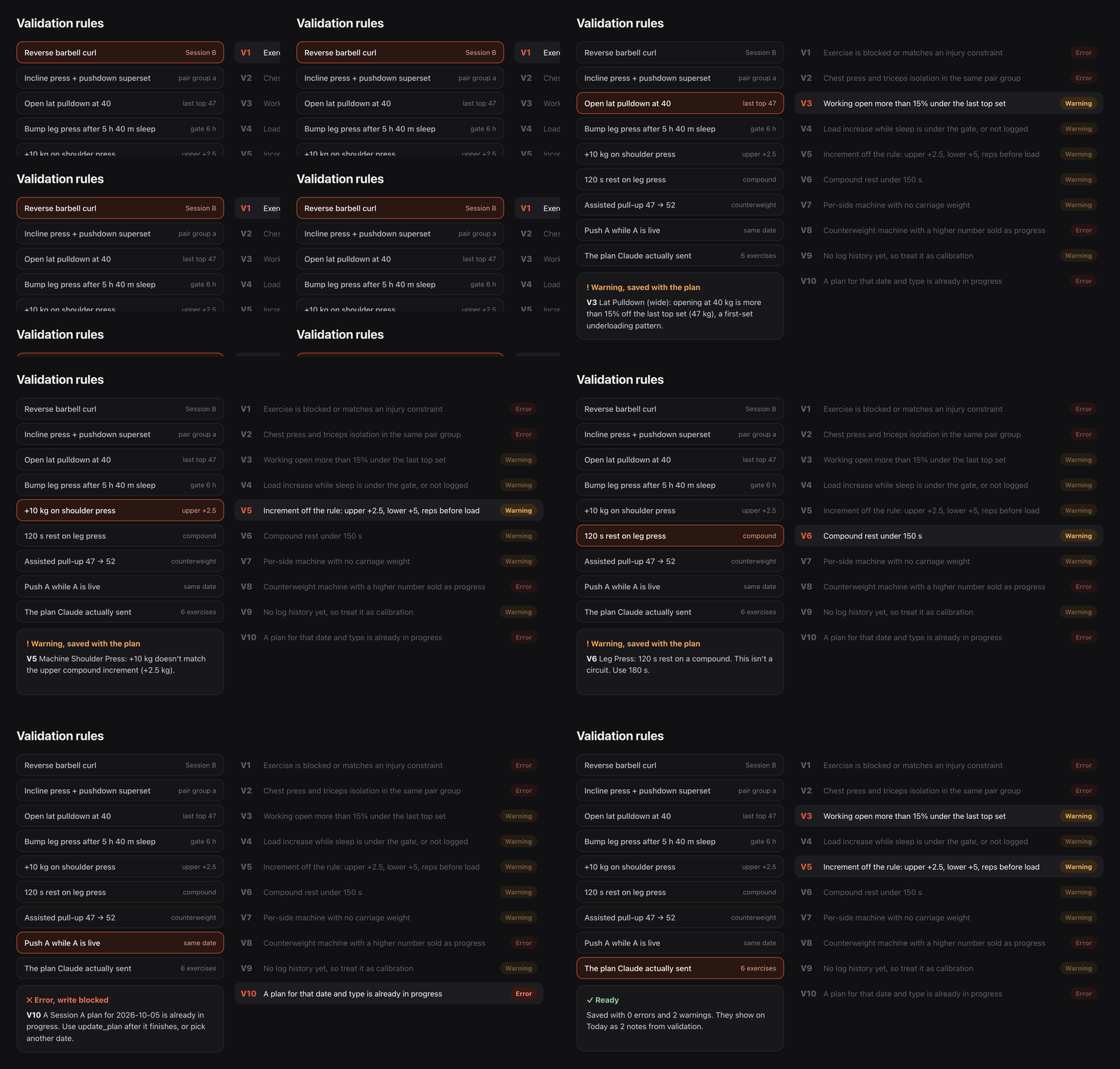
Blocked exercises are matched word by word, ignoring case, punctuation and plurals, so "straight-bar curl" still matches "Barbell Curl (straight bar)". Claude can still plan a blocked exercise if it gives a reason, and that reason gets saved and shown in the session review. Cardio only goes through the first rule, because a treadmill walk doesn't need rest period checks.
Handling Machine Weights
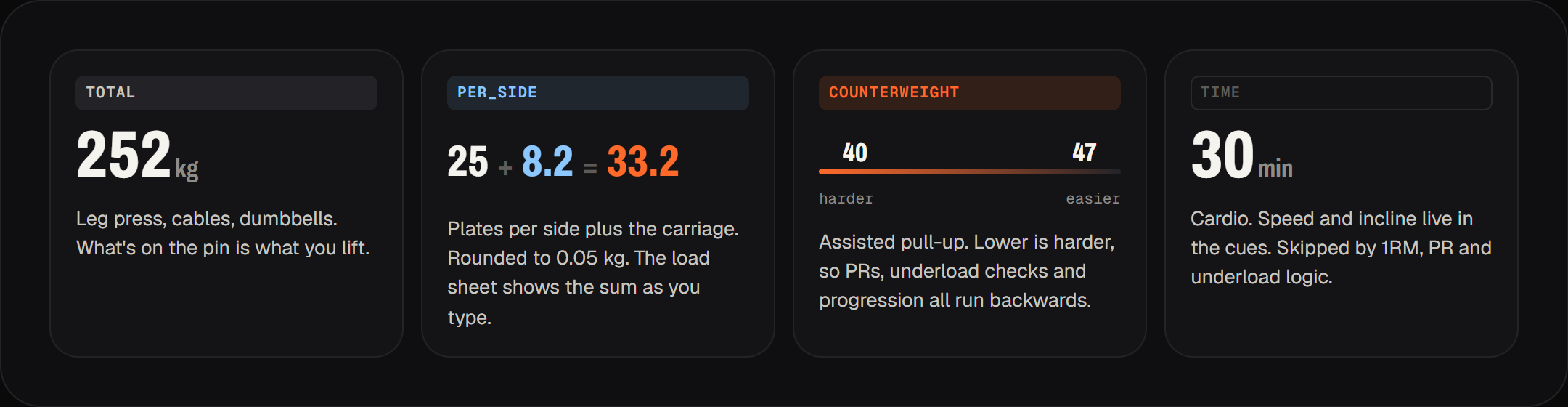
This took the longest to get right, and the validation rules depend on it. My gym has iso-lateral machines where the part you load plates onto has its own weight. So 25 kg of plates on the horizontal press is really 33.2 kg per side. The assisted pull-up works the other way: the number is how much the machine helps you, so 40 is harder than 47. And cardio is measured in minutes, not kilos.
Each exercise has a load mode: TOTAL, PER_SIDE, COUNTERWEIGHT or TIME. Before anything is saved, the weight is converted to the real load. Checks like "is this heavier than last time" or "is this a PR" flip direction for counterweight machines. Claude only ever sees real weights, and the server instructions tell it that.
Connecting Claude
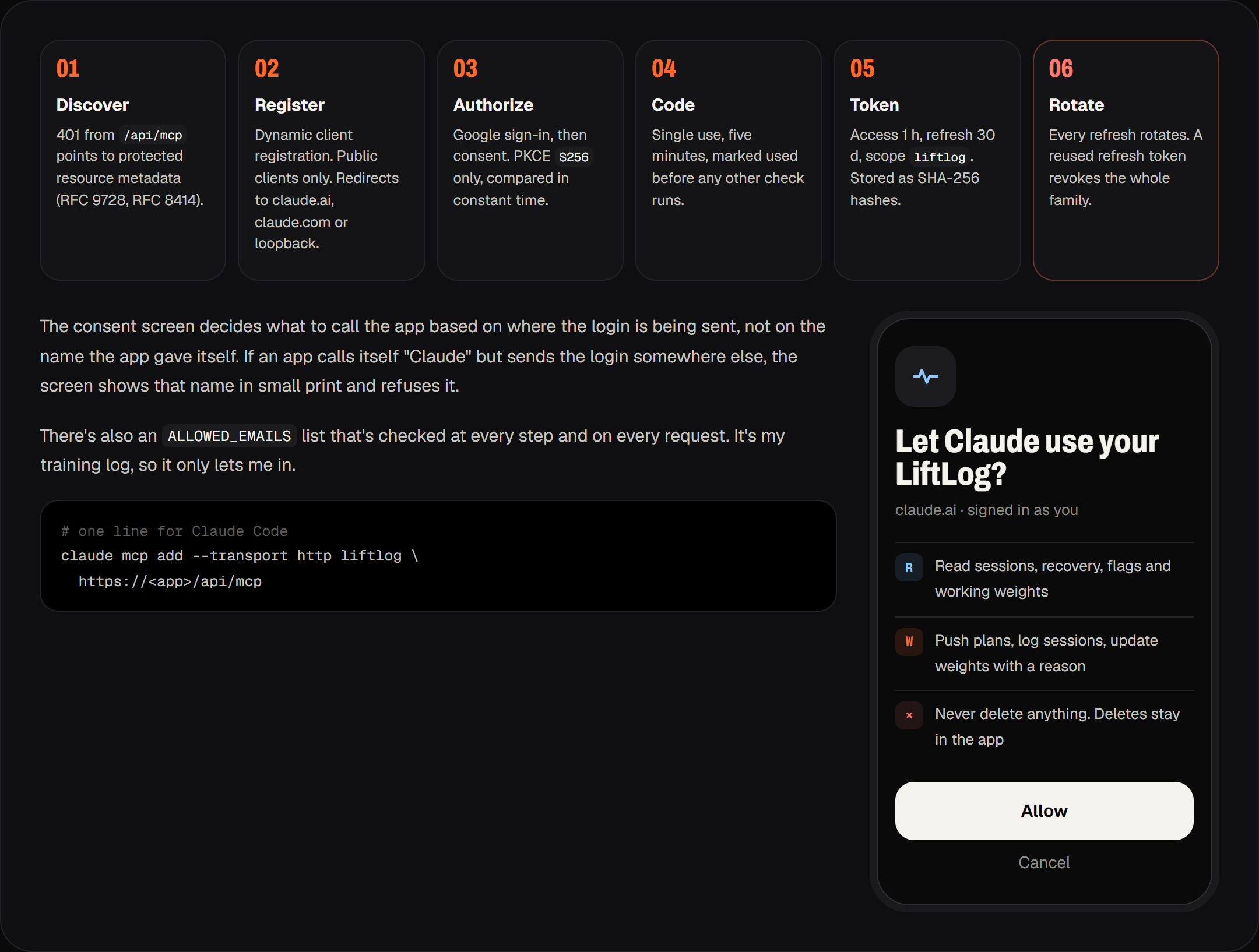
Custom connectors in Claude log in using OAuth 2.1, as described in the MCP spec. I didn't want to pay for an auth service for an app only I use, so Olympus runs its own OAuth server. When Claude connects, I sign in with the same Google account I use for the app, and approve access on a consent screen.
Whoop and Apple Health
A plan is only as good as the recovery data behind it. Each plan has a sleep check: if I slept less than six hours, Claude doesn't increase any weights that day, and if there's no sleep data, it has to ask me first. Whoop tracks my sleep and MyFitnessPal tracks my protein. They don't talk to each other, and only Whoop has an API.
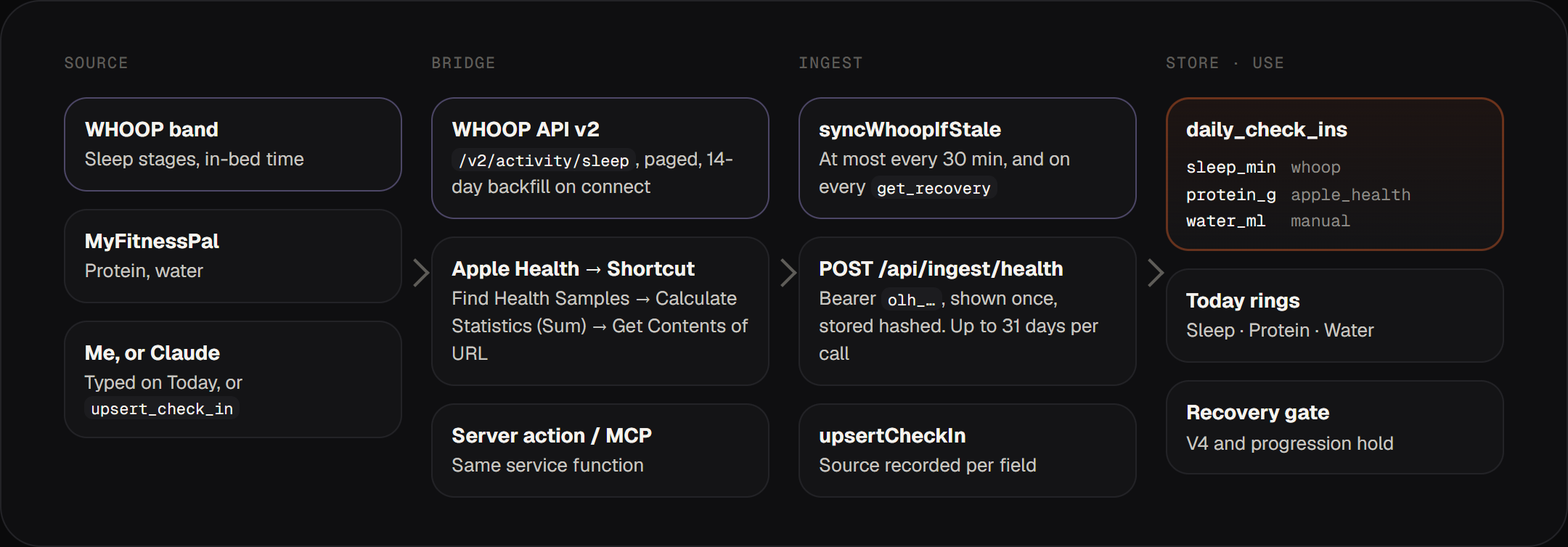
Whoop uses a normal OAuth flow with their v2 API, and I only use the sleep endpoint. There are no webhooks, so the app pulls the data. It gets the last 14 days when I first connect, then syncs at most every 30 minutes while I'm using the app, and again whenever Claude asks for my recovery. To stop two open tabs from syncing at the same time, each sync first claims the slot with a single UPDATE … WHERE last_sync_at < now() - 30 min RETURNING query. Only one request can win it.
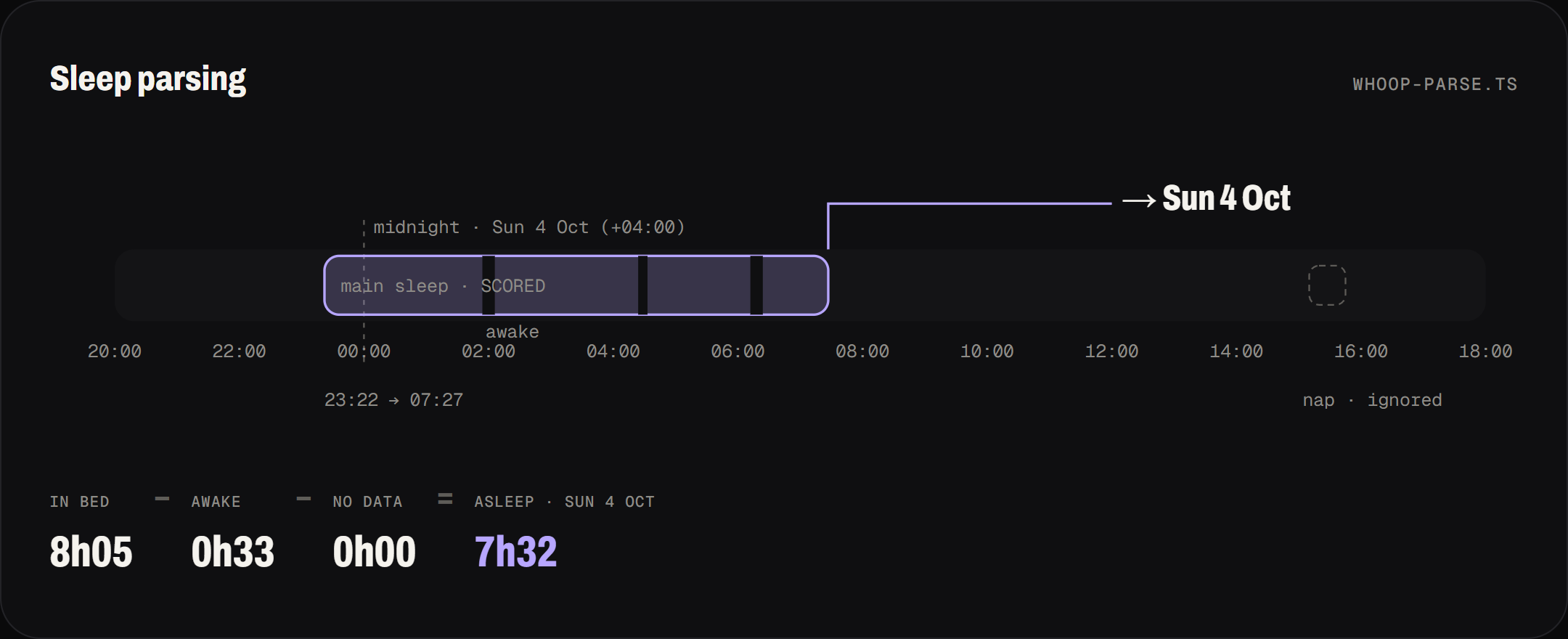
Working out which day a night of sleep belongs to was trickier than fetching it. A night counts for the day I woke up, in the timezone I was in, not the UTC date it started. Sleep time is time in bed minus time awake. Only scored sleeps count, naps are ignored, and if there are two main sleeps on one day, the longer one wins.
Apple Health has no web API, and neither does MyFitnessPal. So MyFitnessPal saves to Apple Health, and an iOS Shortcut reads the day's totals and sends them to /api/ingest/health with a personal token. An automation runs the Shortcut every time I close MyFitnessPal, so the numbers are there before I get to the gym. The token is shown once in Settings and stored as a hash.
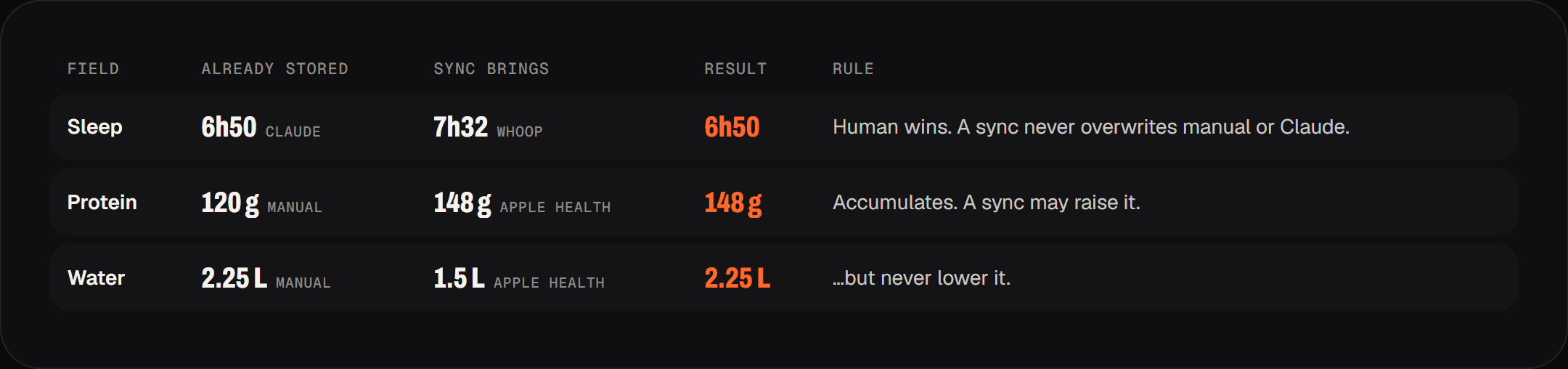
With three sources writing to the same row, I needed rules for which one wins. Every field remembers where its value came from. For sleep, whatever I entered myself, or told Claude, always wins, and a sync never overwrites it. Protein and water go up during the day, so a sync can raise a number I entered but can't lower it.
Offline Logging
I wanted logging a set to feel instant, with or without signal. So every change I make during a session goes through a queue stored in IndexedDB. That includes logging a set, logging water, resolving a note, finishing, and sending to my PT. If I'm online, it's sent straight away. If I'm not, it waits in the queue in order. Editing the same set three times only keeps the latest version, so it sends once instead of three times. Each change stores the full value rather than the difference, so sending the same one twice does no harm. The queue sends everything when the signal comes back or when I reopen the app. If the server rejects something, the screen undoes it and shows a message.
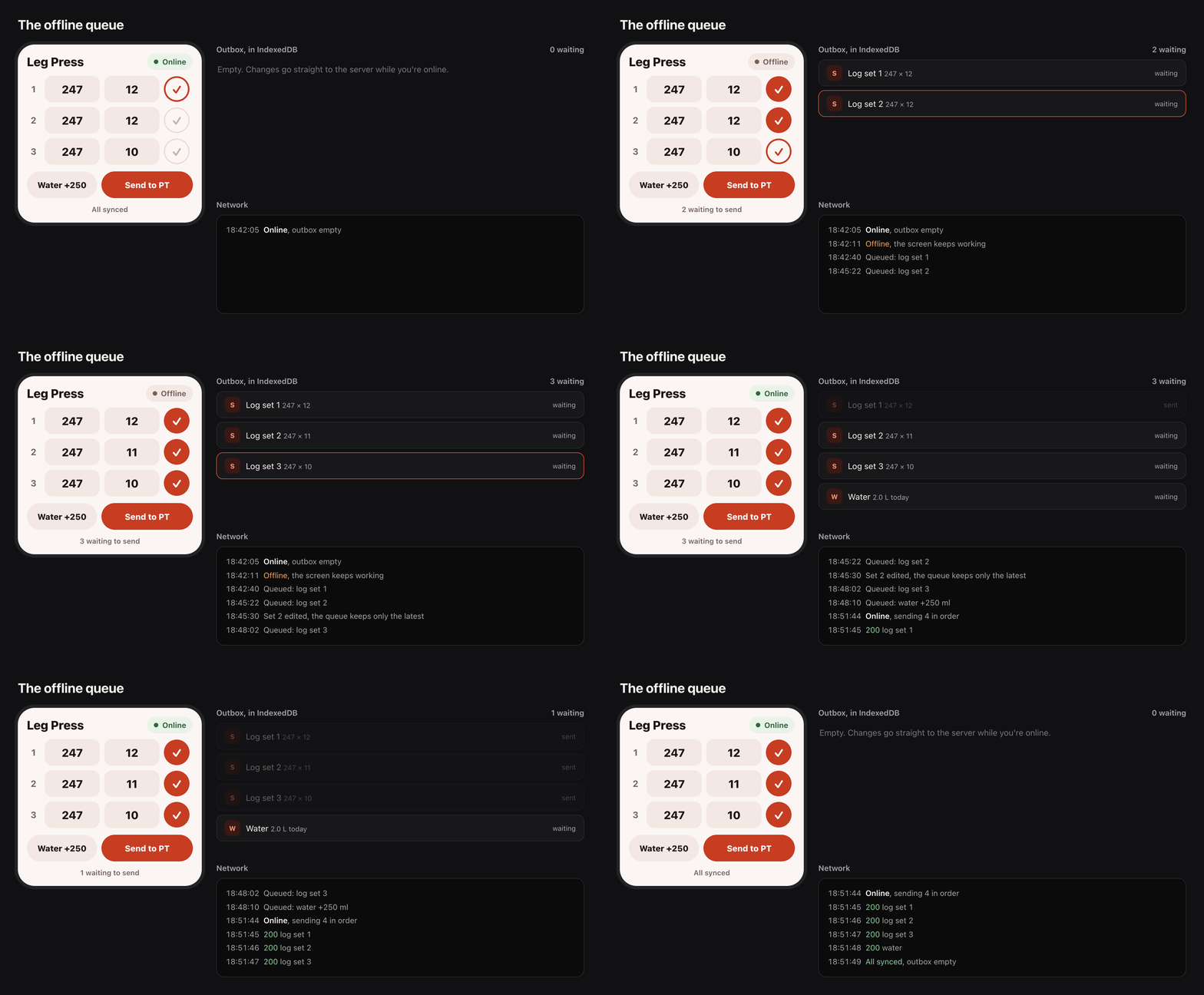
The screen never waits for the network. When I tick a set, the ✓ shows up, the rest timer starts, and the RPE buttons appear right away. The service worker caches pages as I visit them, and the app never reloads itself when the signal comes back, because reloading in the middle of a set would be the worst time.
A few smaller things help a lot at the gym. The screen stays on during a session using the Wake Lock API. Ticking a set gives a small vibration. On Android that's navigator.vibrate. On iOS 18, it toggles a hidden native switch, which was the only way I found to get a haptic from a web app. If I lock my phone during rest, the server sends a notification when rest is over. If the app is already open, the service worker skips it.
The Database
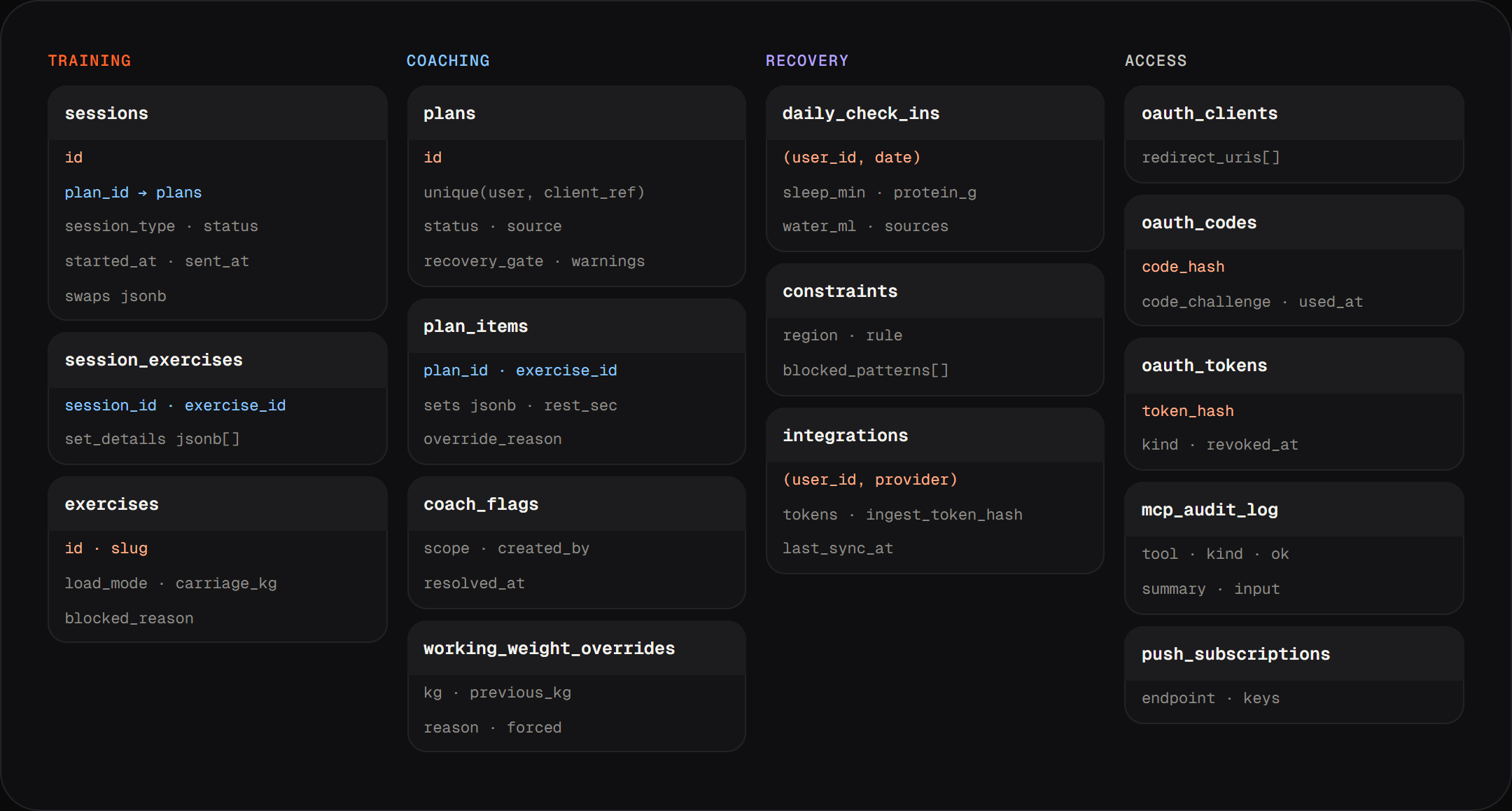
PostgreSQL on Neon, using Drizzle, with five migrations. The folder is still called supabase/ from the first version. The original schema in April had three tables. The rebuild added plans, recovery data, coach notes, and the tables the OAuth server needs.
Design
The second version used an amber accent and Barlow Condensed, and it looked like every other fitness app. The third, Chalk & Ember, was dark with one bright orange accent. It looked sharp, but it still felt generic: monospace labels, all-caps headings, dots between every bit of text, and a lot of grey boxes that all looked the same.
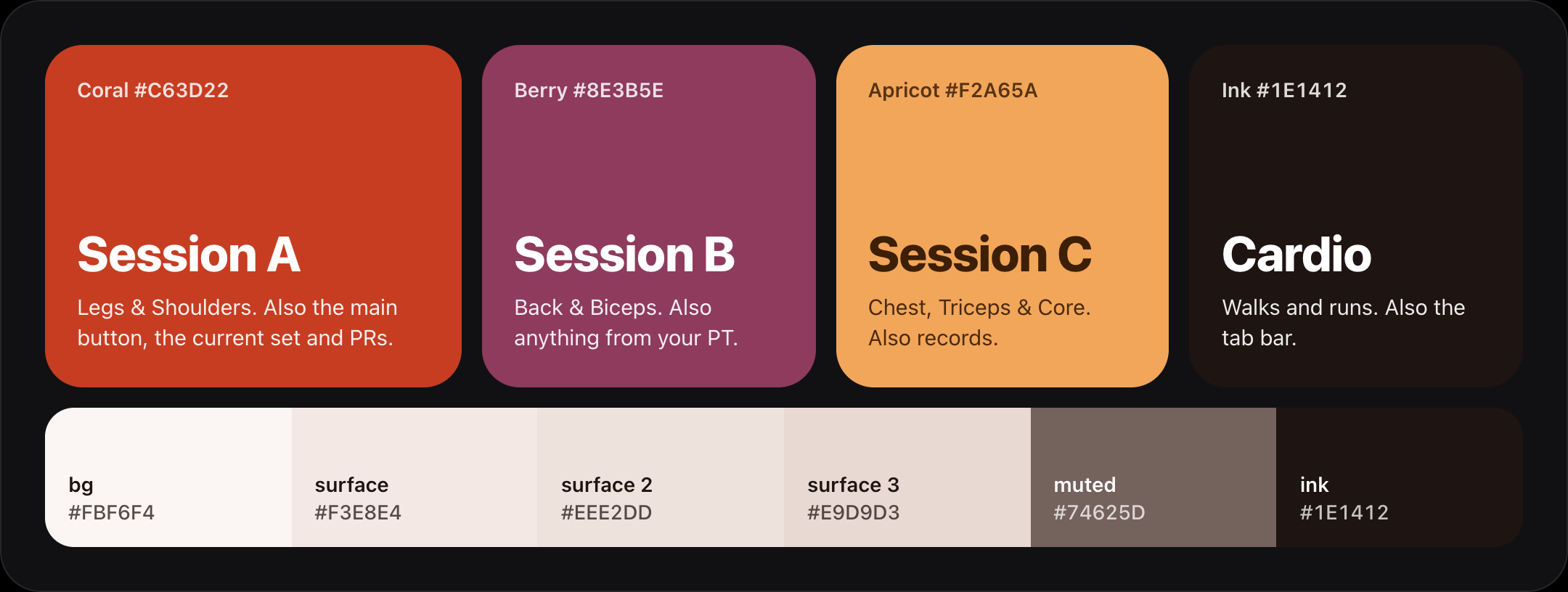
For this version I looked at apps that feel at home on an iPhone and still have a personality, like Whoop, Gentler Streak, AllTrails, Waterllama and Nike Training Club. I followed Apple's Human Interface Guidelines, switched to the system fonts, and built the design around big blocks of colour. I called it Coral.
Each session type has its own colour, and while I train it fills the top of the screen. Session A is coral, B is berry, C is apricot, and cardio is ink. The Today card, the live session, the Finish screen and the calendar in the Log all use the same colours, so I can tell which day it is from across the room. Everything else sits on warm off-white, with no grey.
For text I use SF Pro, the iPhone's own font, so the app feels like part of the phone, and SF Pro Rounded for numbers and big titles. There's no monospace and no all-caps text anywhere. Labels are in sentence case, and lists are written with commas instead of dots. The weight I'm about to lift is 88px, because I need to read 247 from arm's length with my phone on the floor.

I designed the layout to be used with one hand between sets. Every button is at least 44px, and inputs are 16px so iOS doesn't zoom in. For entering weight I built a custom keypad with ±2.5 buttons, recent weights and the PT's target, because the phone keyboard covers half the screen. Tapping the reps adds one, and goes back to 1 after 15. Weight and reps are filled in from the plan, then last session, then the previous set, so most sets only need one tap.
For barbell lifts and plate-loaded machines, the screen also shows what to put on. 110 kg on the deadlift shows 25 + 20 on each side, and the iso-lateral machines take the weight of the arm into account. If standard plates can't make the weight, it says how far off it is.
I wanted it to feel playful without slowing anything down. The ✓ pops when I log a set, and the next set has a ring that gently pulses so I know where to tap. The tab bar has a white pill that springs to the tab I pick. Plates slide onto the bar, the recovery bubbles fill up with a wave like a glass of water, and finishing a session drops confetti with "Crushed it." or "New PR!". Animations that loop only play a few times and then stop, so they don't drain the battery. If reduced motion is turned on, all animations are instant, but the vibrations stay on.
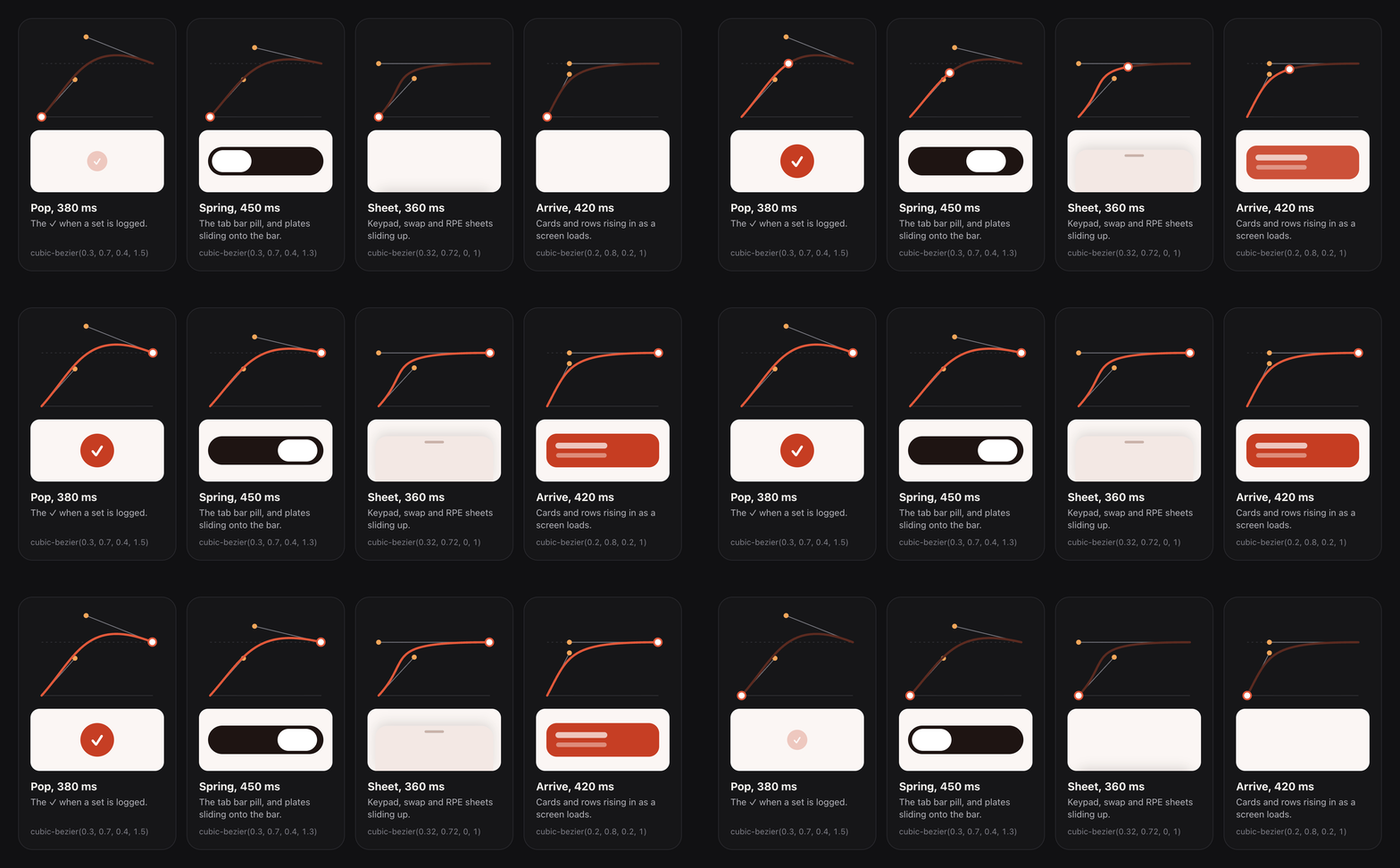
It also had to feel fast. Every tab has a skeleton that shows up the moment I tap, links load in the background before I need them, and the session screen updates before the server replies. Every button shrinks to 96% when pressed, so a tap always feels like it landed.
Form Cues
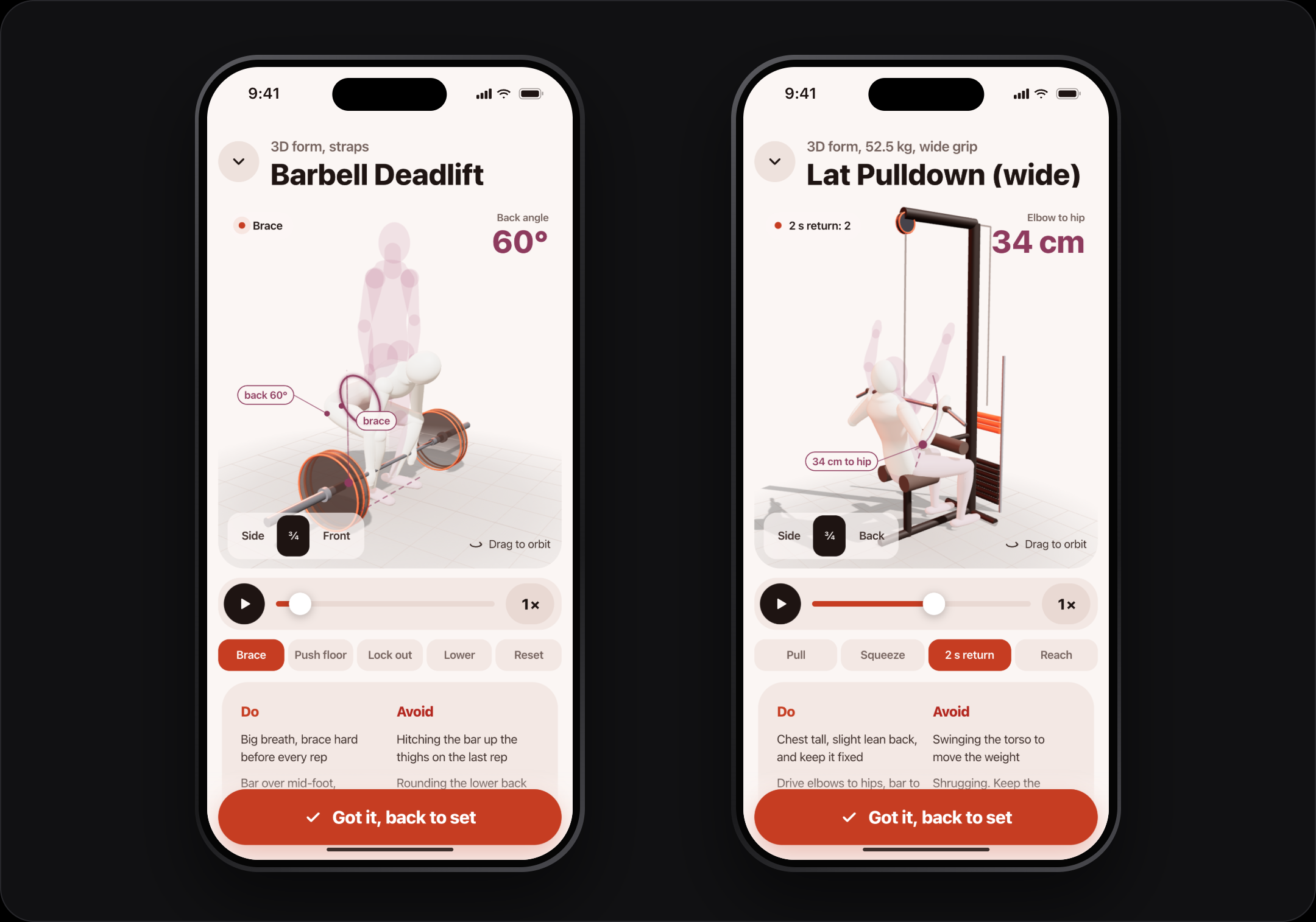
I wanted a quick form reminder for the lifts I keep getting wrong, one tap away from the set I'm logging. Each one is a 3D figure built in code and animated with keyframes. It uses inverse kinematics so the hands stay on the bar and the feet stay on the floor from any angle. three.js only loads when you open a form cue, so it doesn't slow down the rest of the app, and there's a 2D fallback for phones without WebGL. The animation highlights the muscles being worked and shows joint angles, and it pauses when it's off screen.
In the Coral version the figure stands on the same warm floor as the rest of the app. Coral marks the muscles doing the work, and berry is used for the angles and guides.
It's the biggest file in the project at 1,615 lines, and the one I needed least. I still really like it.
Testing
There are 65 unit tests, and most of them are named after real sessions. When something went wrong at the gym, I wrote down the date, turned it into a rule, and put that date in the test name. If a test fails, I know exactly which mistake it's there to catch.
My older workouts were in an Obsidian note: eight sessions between 05/08 and 21/09. I copied them into a JSON file, and a script runs them through the same domain code as a live set, then writes out SQL that's safe to run more than once. So the old sessions get the same PRs and flags as anything logged in the app.
Things I'd Change
The Apple Health connection depends on an iOS Shortcut and an automation. It works, but it's the easiest part to break and the hardest for anyone else to set up. A small native app with HealthKit access would be a lot simpler.
Whoop syncing is pull-based. Every 30 minutes is fine for sleep, since it only changes once a day, but Whoop supports webhooks, and using them would mean the data is never out of date.
The form cue figure is built in code because the 3D model I wanted can't be redistributed. The engine already supports loading a model from /models/athlete.glb, I just haven't found a free one I like yet.
It's also built for one person. Everything is locked to my email, and the exercise library is shared. Opening it up to other people would need separate libraries and injury lists per user, and more thought about what Claude should be allowed to see.
Outcome
Olympus is installed on my phone, connected to Claude on my phone and laptop, and it's what I train with now. It has twelve MCP tools, ten validation rules, its own OAuth server, sleep and nutrition from Whoop and Apple Health, and offline logging that hasn't lost a set yet.
What made the biggest difference was moving the rules out of the chat and into the server. Before, every session meant typing my weights, sleep, protein and water into a chat and copying plans back into my notes. Now the app records all of that as I train, Claude reads it directly, and the server rejects plans that break the rules.
Tech Stack: Next.js 15 · React 18 · TypeScript · Tailwind CSS · Postgres (Neon) · Drizzle ORM · NextAuth v5 · Model Context Protocol SDK · OAuth 2.1 · Zod · three.js · IndexedDB · Web Push · next-pwa · Vitest · WHOOP API v2 · Apple Health via iOS Shortcuts · Vercel