
Nexus Routines
automations where AI decides and people approve
- Year
- 2026
- Role
- Design and engineering
- Built with
- React Flow, Temporal, Fastify, Slack
Automations for the work that's left after a chat ends, like reviewing a claim or following up on a ticket. AI steps make the judgment calls, and a person approves anything that needs one. I designed it and built most of the frontend and part of the backend.
automations where AI decides and people approve

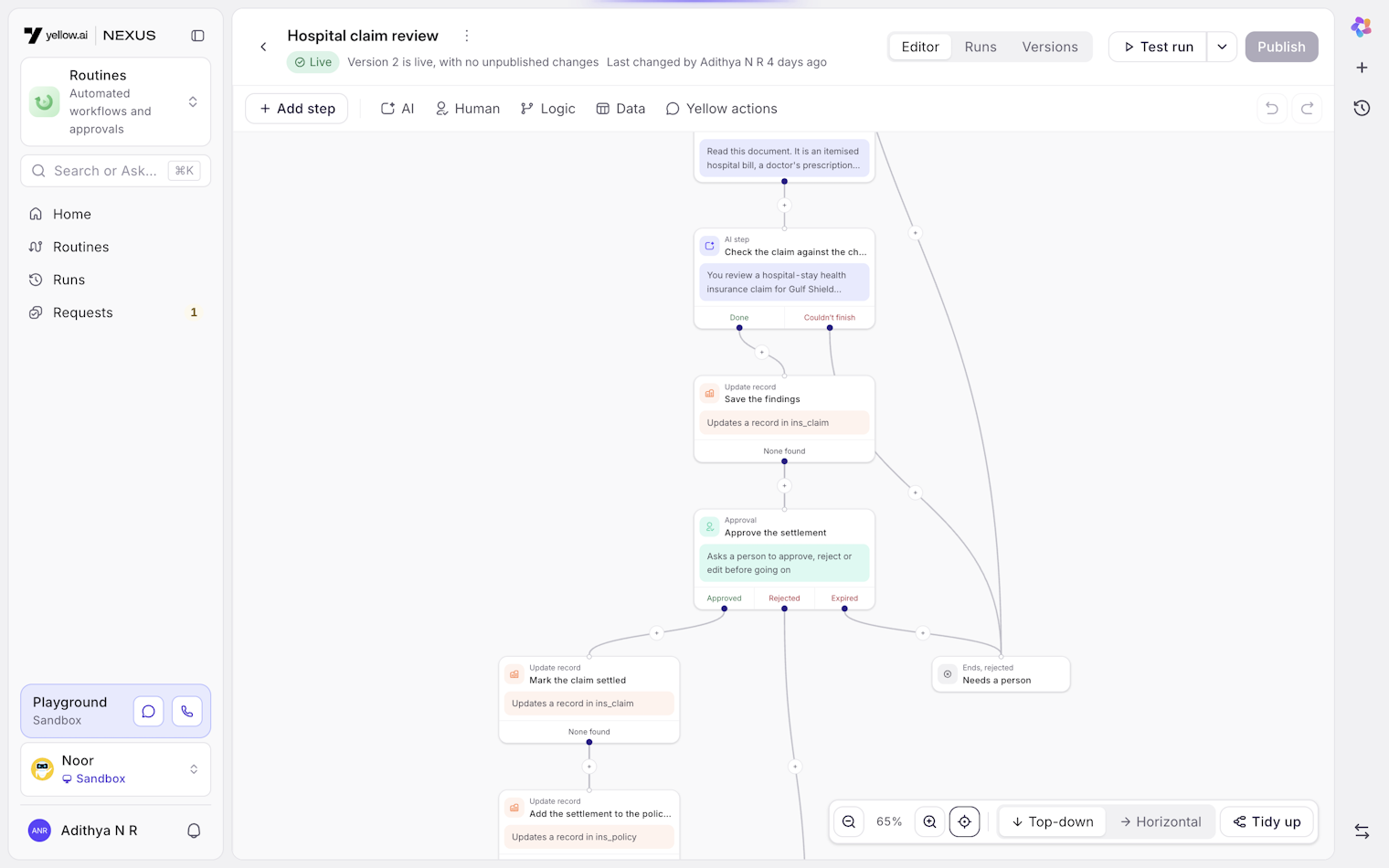
Routines is the automation product in Nexus, Yellow.ai's platform for building AI customer service agents. Something happens, like a ticket going quiet, a record changing, a form coming in or a set time arriving, and a routine starts. Fixed steps move data around, AI steps make judgment calls, and a person approves anything that needs one.
I designed it and built most of the frontend and part of the backend in October and November 2026.
It replaced an older feature called background workflows. Those could move data, but they couldn't wait for a person or make a judgment call, and when they failed, nobody found out.
Most of what customers wanted from an AI agent didn't end when the chat did. A customer files a hospital claim in chat, and then someone has to read the documents, check the policy, decide and reply. A lead fills in a form, and then someone has to qualify it and pass it to the right salesperson.
That second half lived in spreadsheets, other tools or somebody's memory. The agent had no part in it.
It started as "Background agents", was called "Weft" for about a week, and shipped as Routines. Nobody understood Weft without an explanation.
Where it lived was the bigger change. The first version sat at the workspace level, above all your agents, with a hidden agent underneath to run it. That raised questions we had no good answers to. Which agent's data could it touch? Whose team approved things? Where did its runs show up?
On 13 October we moved routines inside each agent, next to Flows and Inbox. A routine now uses its agent's data and team, and its runs sit next to that agent's conversations.
The builder is a canvas, but you can't drag steps around. Steps arrange themselves, top to bottom or left to right. I went back and forth on this. Placing steps freely feels like more control, but in most workflow tools I looked at, it ended in diagrams with crossing lines and branches nobody could follow. With automatic layout, every routine reads the same way, including ones somebody else built.
Sticky notes are the exception. They move freely, since a note isn't part of the routine.
The layout library put each step slightly off to one side of the steps below it, which made every branch look a bit broken. I added a pass after layout that centres each step over the ones below it. It's a small file, and the canvas looks much better for it.
A few smaller decisions:
Adding a step in the middle of a connection splits it. The new step's first exit carries on to what came next, and any other exits get their own end step, so there's never a loose branch to tidy up.
Undo groups edits made within a second of each other, so renaming a step doesn't take forty undos to reverse.
Drafts save about a second after you stop editing. If two people edit the same draft, the second save is caught, and a banner lets you load their version or keep yours.
Your layout direction is remembered, but a link can carry it too. If I send you a wide routine, it opens left to right for you as well.
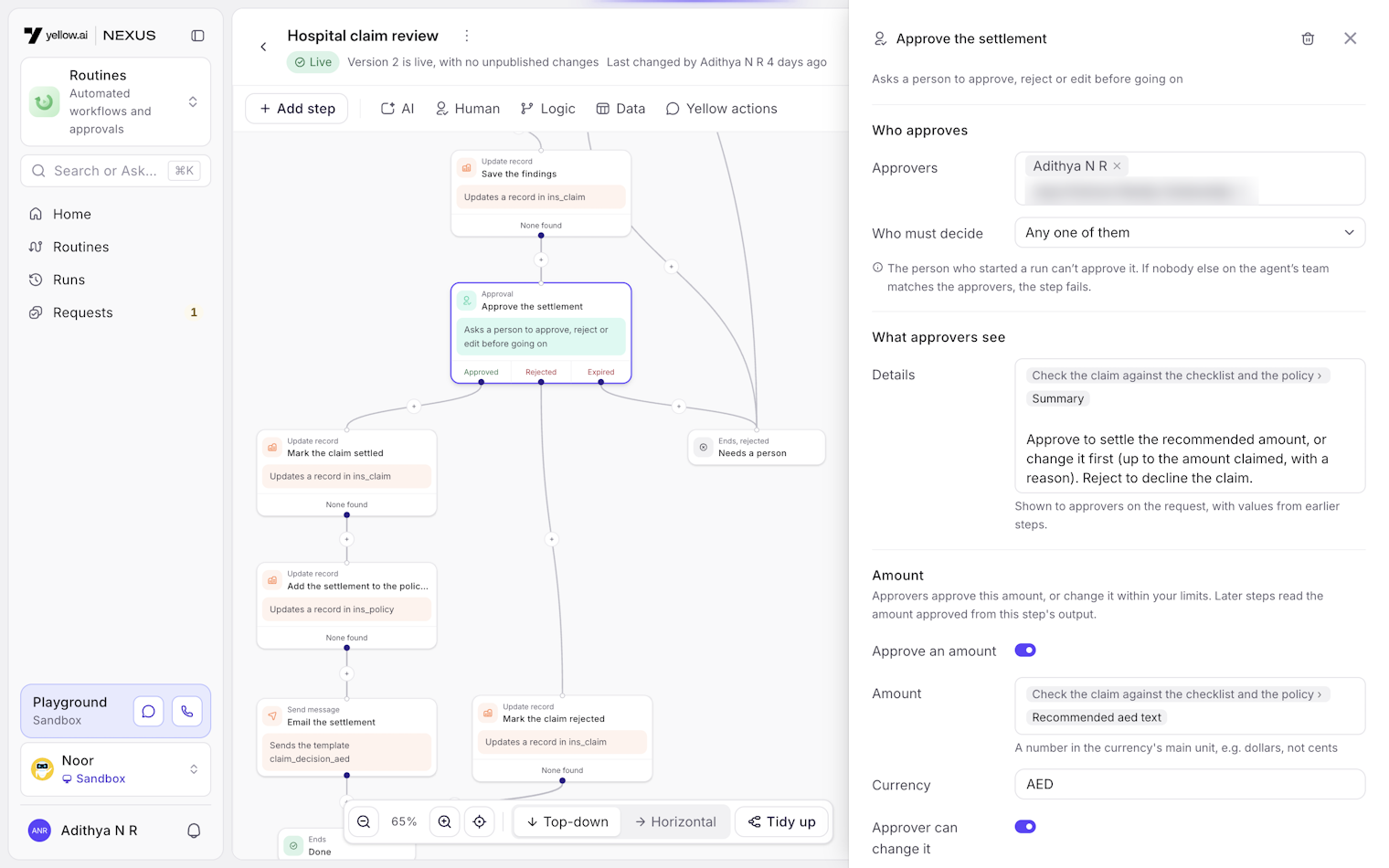
Clicking a step opens its settings in a drawer on the right. There are about 35 of these panels, and with that many, the risk is that each one ends up slightly different.
They all share one layout. Labels sit in a fixed column on the left and controls on the right, sections are separated by thin lines, and every control is the same height. It reads like a list of properties.
An earlier version put labels above the fields and tucked advanced options into sections you could collapse. It looked friendlier, but it was slower to scan, and people missed the settings that were collapsed.
You can describe a routine and let the copilot draft it, start from a template, or build it by hand. All of them produce the same routine format and pass the same checks. The builder, the copilot and our MCP tools all read and write that one format, so an AI can't make a routine the builder can't open, and the copilot can edit a routine someone built by hand.
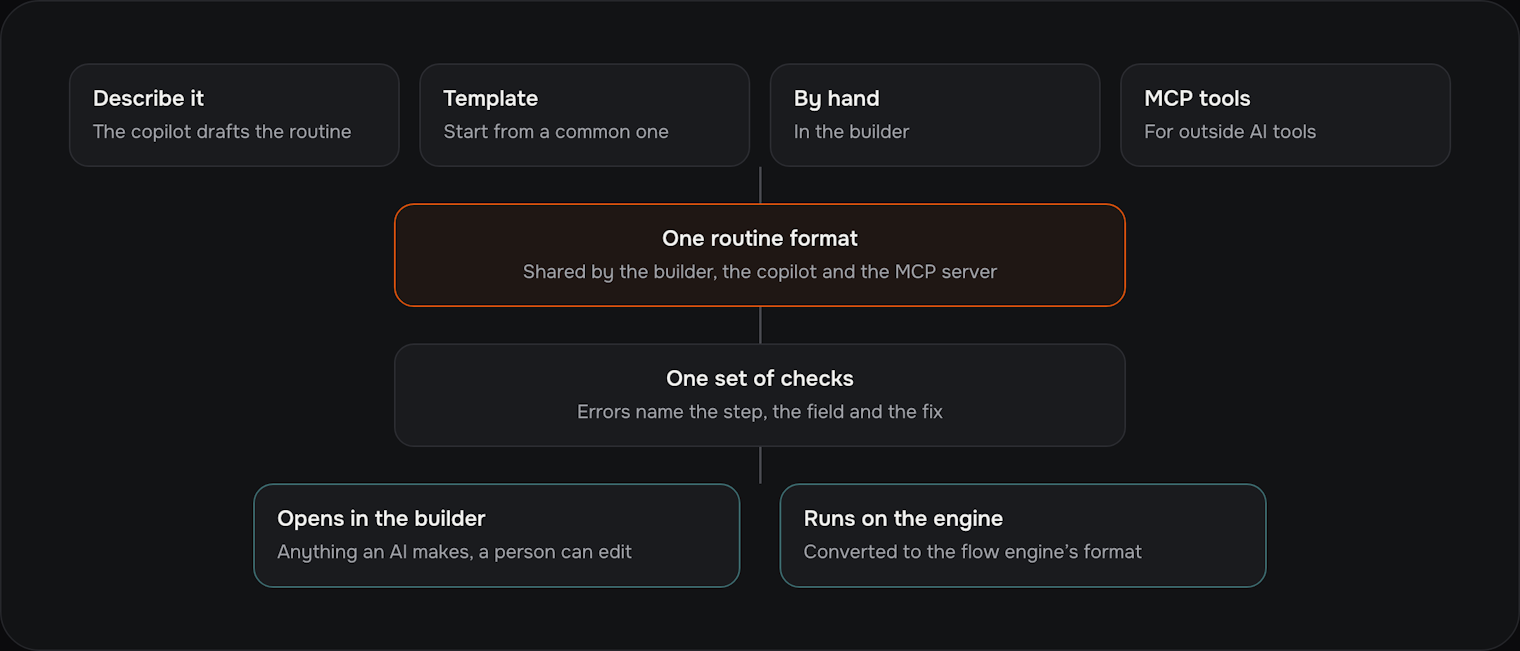
When a check fails, the error names the step, the field and how to fix it. The publish dialog pins each problem to its step on the canvas, and clicking a problem takes you to it.
A routine can start on a schedule, from a webhook, by hand, from another routine, from an Inbox ticket event (including "no reply in X hours"), when a conversation ends, from Slack, or when a record changes.
Each trigger has rules for which events get through. There are filters, duplicate checks, rate limits and business hours, and a new event can skip or cancel an earlier run for the same record. I left out queueing per record and limits on how many runs happen at once. Nobody had asked for them yet, and they're easy to get wrong.
Steps come in four groups:
AI: judge, classify, extract, draft, read a document, or run a custom prompt.
People: approval, task, or asking someone for information.
Logic: conditions, waiting (for a time, an event or a reply), repeating for each item, parallel branches, running another routine, and stopping.
Actions: updating Inbox, sending messages over chat, email, WhatsApp, SMS and Slack, calling an API, and finding, creating or updating records.
Steps that weren't ready yet show as dimmed "Coming soon" rows instead of being hidden. That told us which ones people were waiting for.
Approval steps create requests, and those needed a page of their own. My first instinct was a table. I built an inbox instead, with the list on the left and the request on the right. There are keyboard shortcuts to approve, reject or skip, and the next request opens as soon as you decide.
Each decision waits five seconds before it's sent, with an Undo button. People approving quickly will sometimes click the wrong thing, and fixing that shouldn't need an admin.
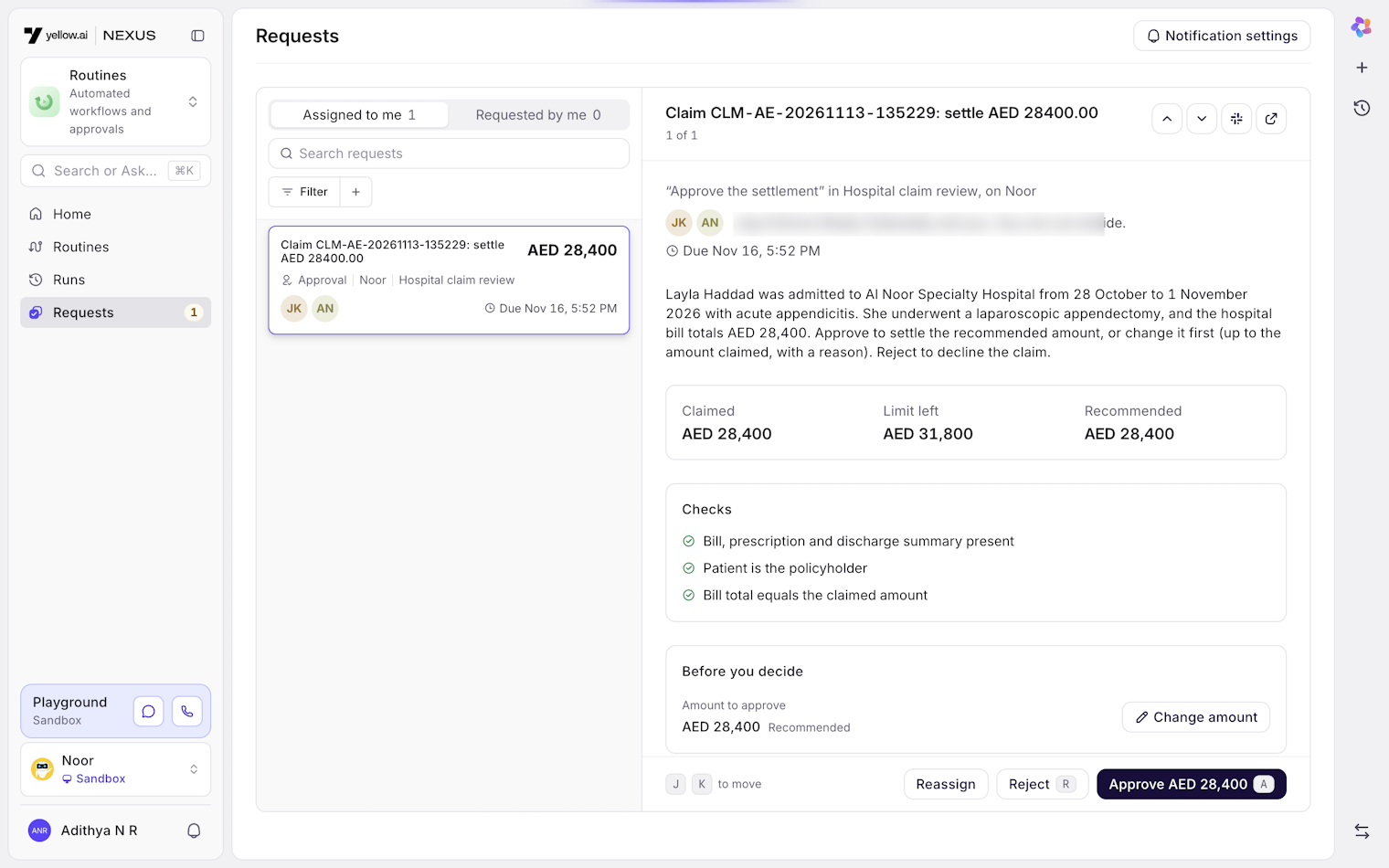
A few more rules came from thinking about who actually approves things:
You can't approve a request from a run you started. If that leaves nobody to approve it, the request is refused rather than handed to the routine's owner.
Out of office takes a date range and someone to cover for you. Every time, the server checks that person is allowed to decide that request, and if they aren't, it goes to the step's backup approver.
Sensitive fields are hidden on the request. You can reveal one, and every reveal is logged.
We had two ways to test a routine. A dry run that pretends to do every write is cheaper, but it doesn't show what really happens. The email that "would have been sent" isn't the email that gets sent. A real run of the draft against a test agent shows exactly what happens.
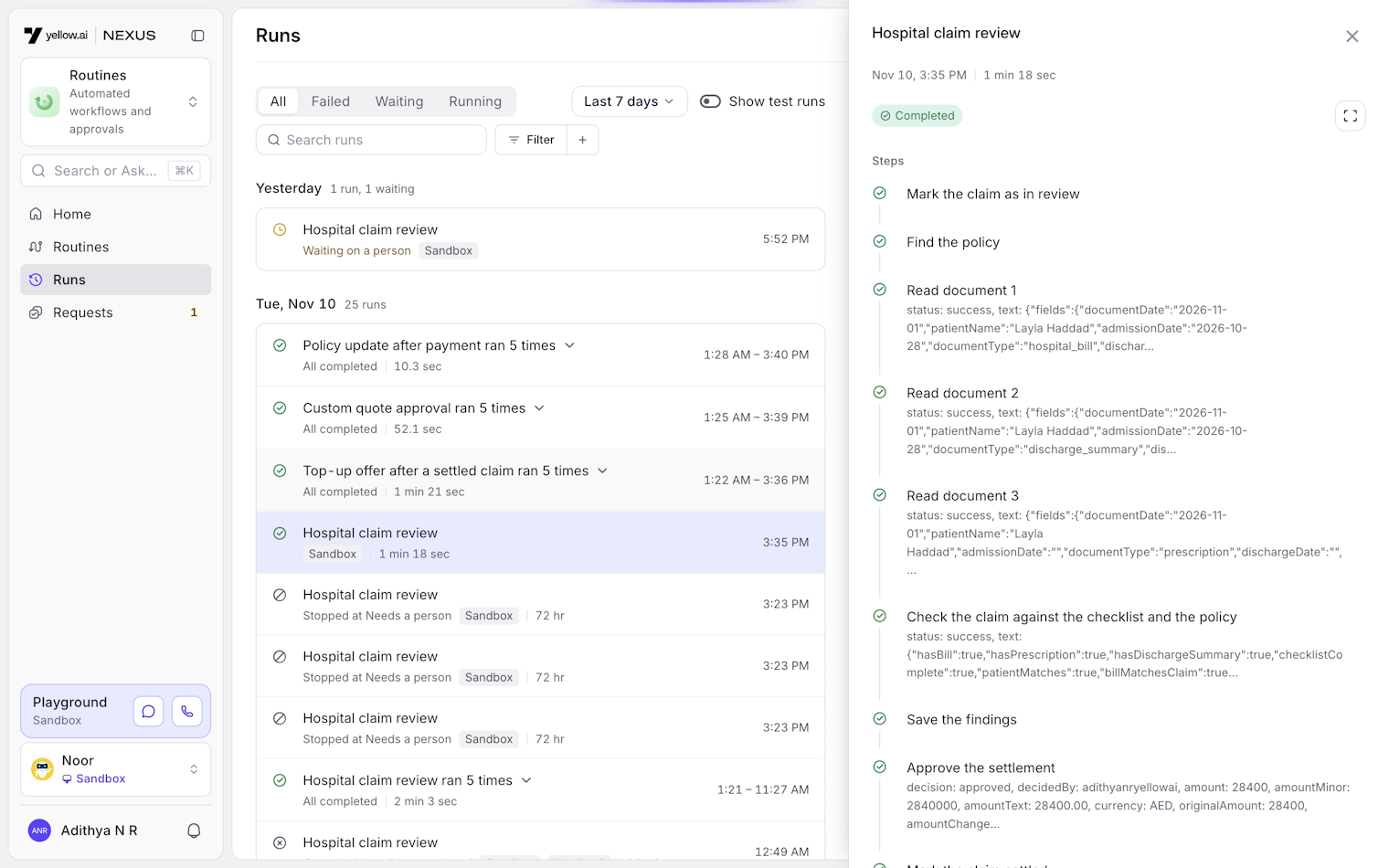
We went with real runs. A test saves the draft as a hidden test version and runs it from start to finish on the agent's sandbox. If the routine asks for an approval during a test, it opens inside the builder, on the same card a real approver sees. You can start a test from a real event that already happened, so the input is something real.
If a step fails, a bar at the bottom explains it in plain words, with the raw engine error under "Show details".
AI steps can also be tested on their own, which is where most of the tweaking happens.
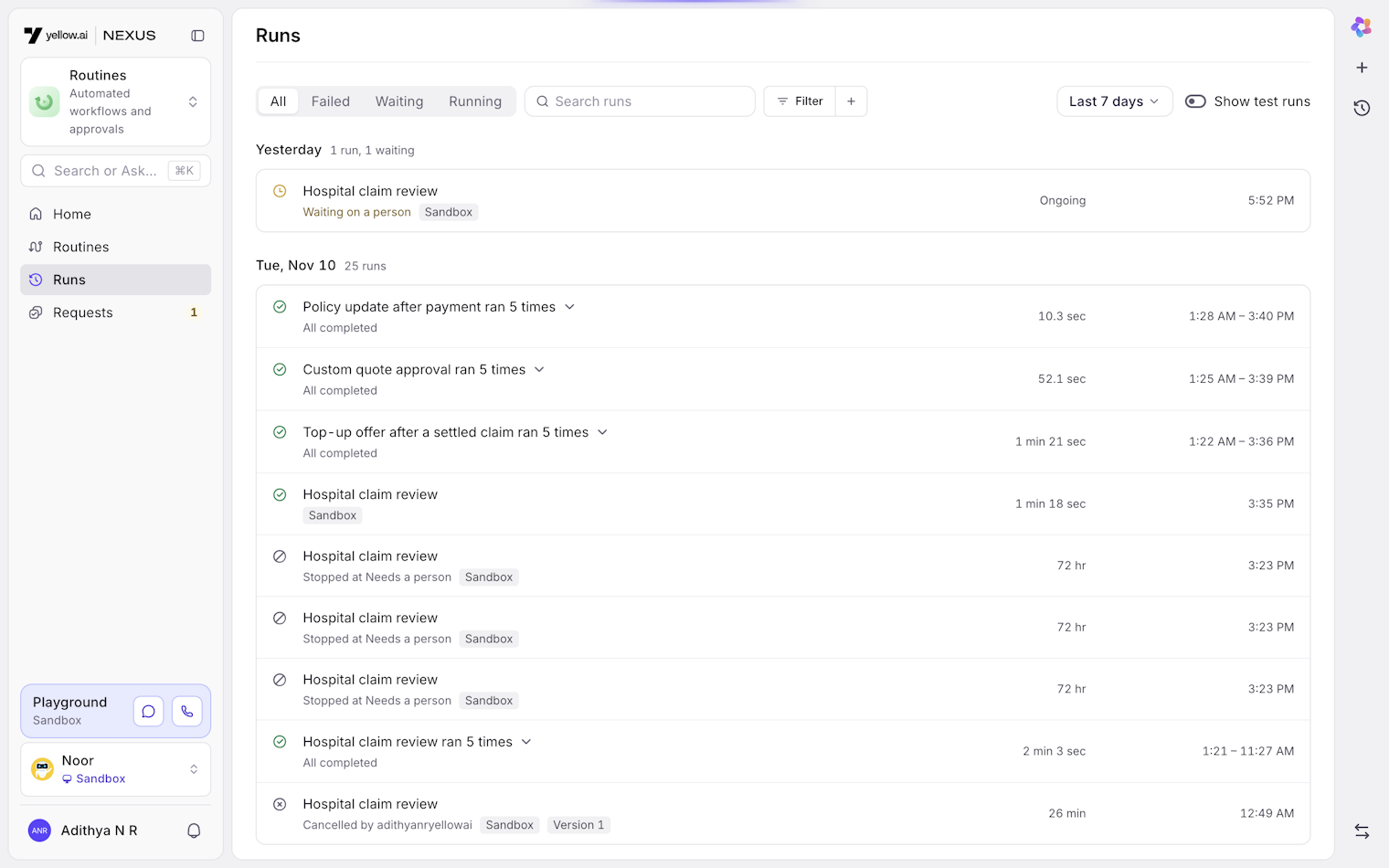
The runs log is grouped by day. When three or more identical successful runs happen in a row, they fold into one row with a count, so a routine that runs every five minutes doesn't bury the one run you're looking for. Failures never fold.
The routines home page shows a 14-day health strip for each routine. The first version used one scale for every row, which flattened everything except the busiest routine, so now each row has its own scale.
I also tried number tiles above the list, a carousel of templates and red-tinted rows for failures, and dropped all of them. None of them helped anyone find a broken routine faster.
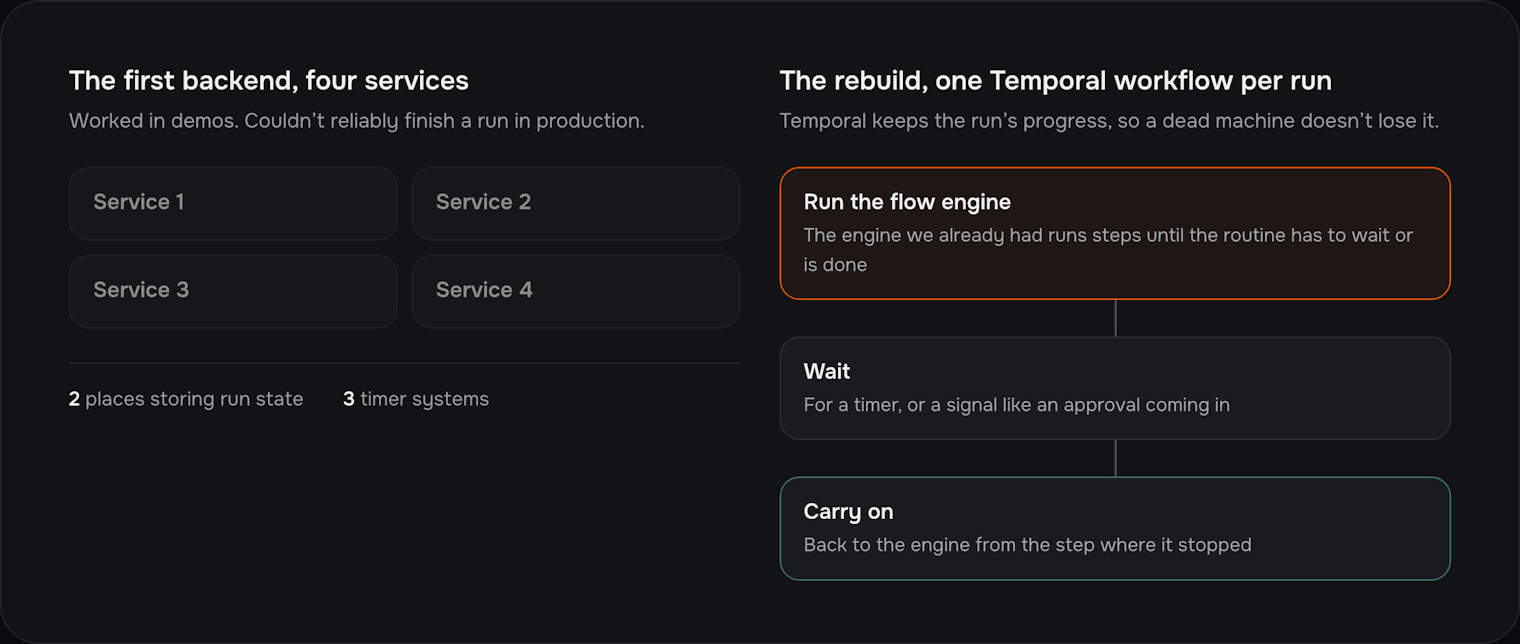
The first backend split each run across four services, with run state stored in two places and three separate timer systems. It worked in demos but couldn't reliably finish a run in production. On 15 October we threw it out.
In the rebuild, each run is a Temporal workflow. Temporal is a system for long-running jobs that keeps track of their progress, so if a machine dies, the run carries on where it left off. The workflow hands the run to our existing flow engine, which runs steps until the routine has to wait or is done. Then the workflow waits for a timer or a signal, like an approval coming in, and hands the run back. That reused years of work on the flow engine.
Routines are stored as the old background workflow type with a flag, instead of as a new type. A new type would have meant finding every place the engine checks the type, and missing one would fail without any error.
Most of the rest of the engine is there so that failures are safe.
Every step that touches the outside world, like sending an email, goes through a ledger. If a run is killed halfway through, it fails with a clear error instead of retrying and sending the email twice.
When a run retries, the AI's earlier answers are replayed, so an AI step makes the same choices the second time.
Reminders, escalations and expiry on approvals are timers inside the workflow, so there's no separate scheduled job to keep in step.
An approval is saved first and then delivered to the workflow in order, retrying with longer and longer waits, and set aside after a day. If delivery fails, the request shows "Retry now" instead of quietly hanging.
Large step outputs go to file storage, with a preview kept in the run. A cleanup job deletes old ones, but it knows which runs are still waiting. A simple expiry rule on the storage would have deleted files that paused runs still needed.
Routines can post to Slack, take approvals there, and be started from it. Nexus runs in several regions, and the obvious design was one Slack app per region. Customers would have had to install several apps, we'd have had several to look after, and a Slack workspace used across regions wouldn't have worked.
We built one app with a small router in front of it. Each region still checks Slack's signature itself, calls between regions are signed, and the app's home tab shows routines from every region the workspace uses.
There are a little over 200 test files across the engine, the backends, the shared routine format and the frontend. The workflow tests, which run whole routines against Temporal's test environment, caught the most bugs. Tests that convert a routine to the engine's format and back again caught most of the rest.
Before launch we ran 91 end-to-end tests against a live region. The first pass found real bugs. Inbox triggers lost their event data, the ticket went missing after a routine paused, and "no reply" triggers were dropped. All of them were fixed before customers saw them.
The first backend cost us about a week. I should have argued earlier, and harder, for reusing the flow engine.
Approvers are individual people for now. Teams and roles were cut so we could ship on time, and they're the first thing customers ask for.
The architecture doc is still marked as a draft. The code moved faster than the docs, and a couple of decisions, like how long outputs are kept, are written down one way and built another.
Routines went live in every production region at the end of October 2026, about three weeks after we moved it into agents and two weeks after the engine rebuild. Claims review, lead routing and ticket follow-ups are built on it now, and the copilot can build a working routine from one sentence.
