
Nexus Copilot
the assistant docked beside every page of Nexus
- Year
- 2026
- Role
- Design and engineering
- Built with
- React, Node.js, MCP, Server-Sent Events
The assistant on the right of every page in Nexus, Yellow.ai's platform for building AI customer service agents. You ask it to build or change something, and it does the work and checks with you before saving anything.
the assistant docked beside every page of Nexus


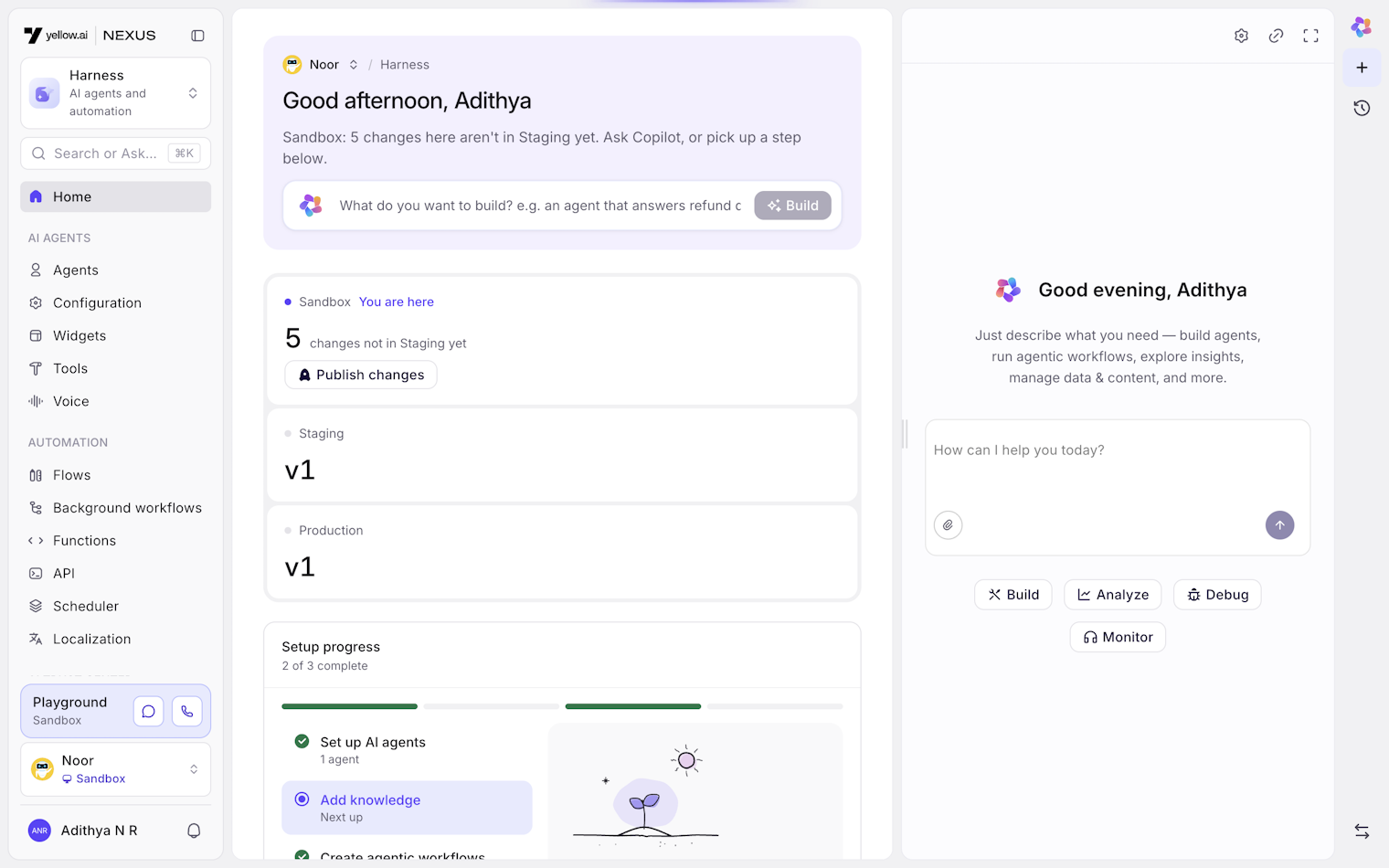
Nexus is the platform at Yellow.ai where companies build their AI customer service agents. An insurance company, for example, builds an agent that takes hospital claims over chat, connects it to their own systems, and then keeps an eye on how it's doing.
The copilot is the assistant on the right of every page in Nexus. You can ask it to build an agent, change a conversation flow, or explain why fewer chats were resolved last week, and it makes those changes in Nexus itself. Before it saves anything, it shows you exactly what will change and waits for you to say yes.
I designed the panel and worked on both the frontend and the copilot service from December 2025 to November 2026. In October we rebuilt the service, and a lot of this build log is about why.
The first mockups gave the copilot a page of its own. That fell apart as soon as we tried using it. If you're looking at a flow and want to change it, you shouldn't have to leave the flow to ask.
So it became a panel that sits beside whatever page you're on and stays open as you move around. Chat history, approvals and settings all live inside it. It opens at 450px, you can drag it wider, and there's a full-screen mode for long answers. It remembers its width and whether you left it open.
Other parts of Nexus open it for you. The "Describe it" box in the routine builder, test case generation in the test lab and the analytics overview all open the panel with your message already typed in.
There's also a small fix I'm fond of. If the panel is full screen and the copilot takes you to another page, it leaves full screen first. Before that, the page changed behind the panel and it looked like nothing had happened.
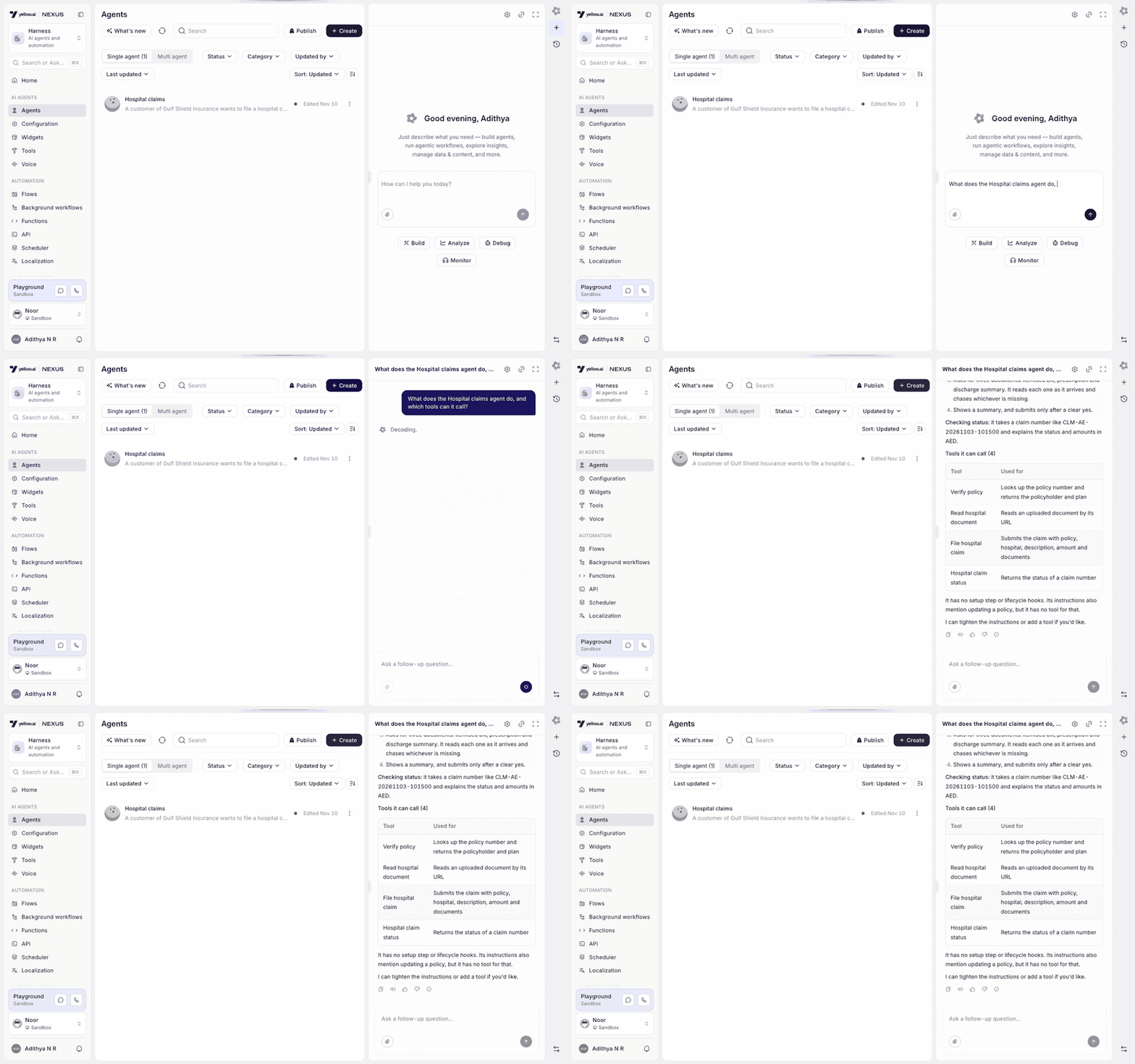
The copilot has close to 200 tools, like reading an agent's settings, querying analytics or editing a flow, and one answer can use a dozen of them. A dozen tool calls scrolling past is noise, but hiding them makes the copilot feel like a black box.
So tool calls show as a short list of steps above the reply. The list stays open while the copilot works and folds away a moment after the answer is done. If a tool fails and gets retried, it shows up once, with how it ended.
Answers can include charts, tables and grids of numbers, drawn with the same components as the rest of Nexus. Long reports open in a separate document view so they don't take over the chat.
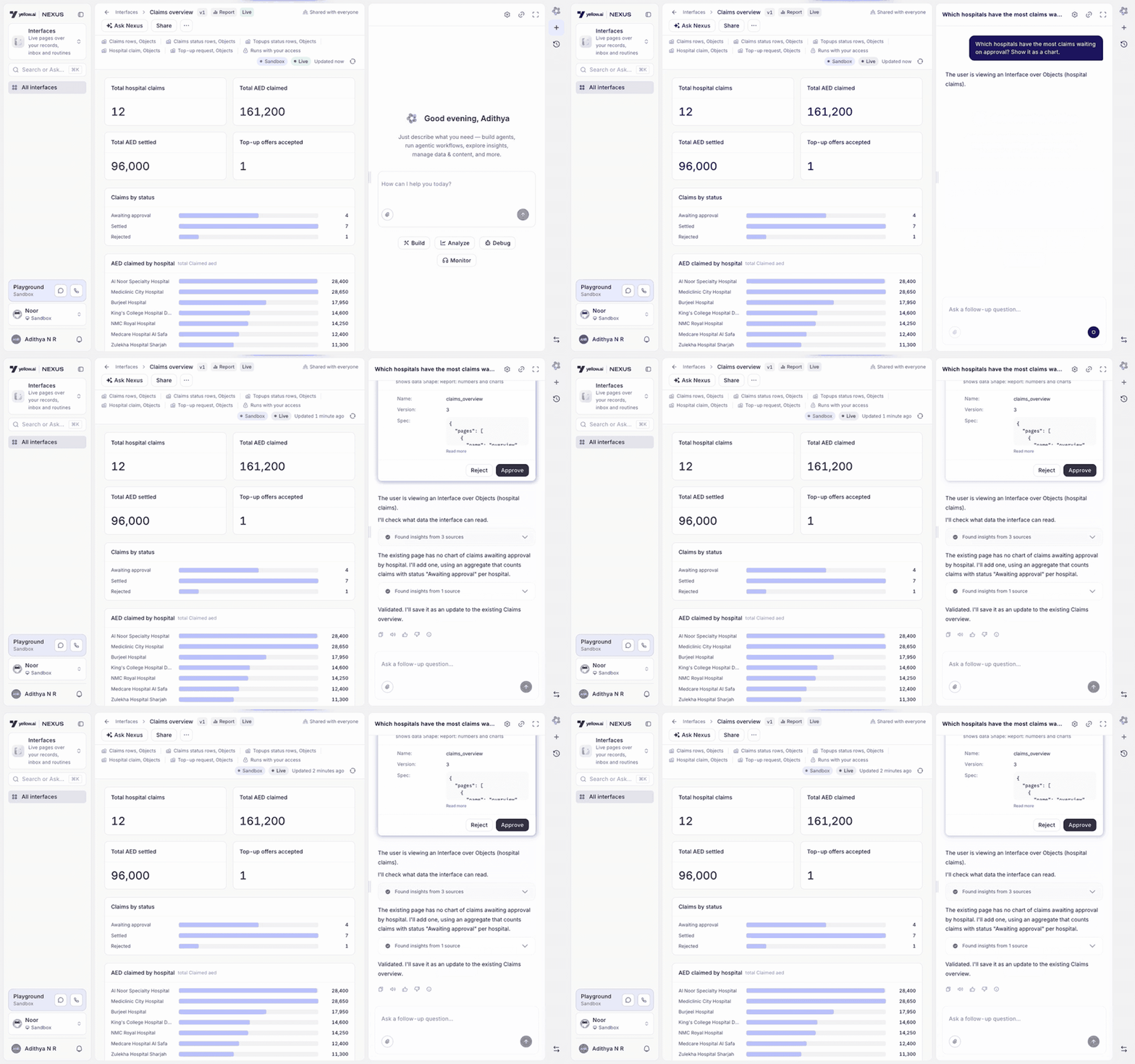
Every tool that changes something in Nexus is marked as a write. When the copilot calls one, it stops and shows a card.
The card lists every field that will change, with the old and new value, so you see "Tone: Formal → Friendly" rather than "update agent". You can approve, reject, or reject with a note that goes back to the copilot so it can try again.
Two problems showed up once people started using it. The first was being asked twice. Models like to write "Shall I go ahead?" and then show the card as well, so you'd confirm once in text and again on the card. We told the copilot in its instructions that the card is the only confirmation it needs.
The second was building a whole agent. That touches dozens of things, and a card for each one made the copilot unusable. Now it proposes a build plan first. You approve the plan once, and each change that matches a step in it goes through without another card. Each step can only be used once, and the approval runs out after a couple of hours.
Some tools are blocked on agents that are live with customers, no matter what you approve.
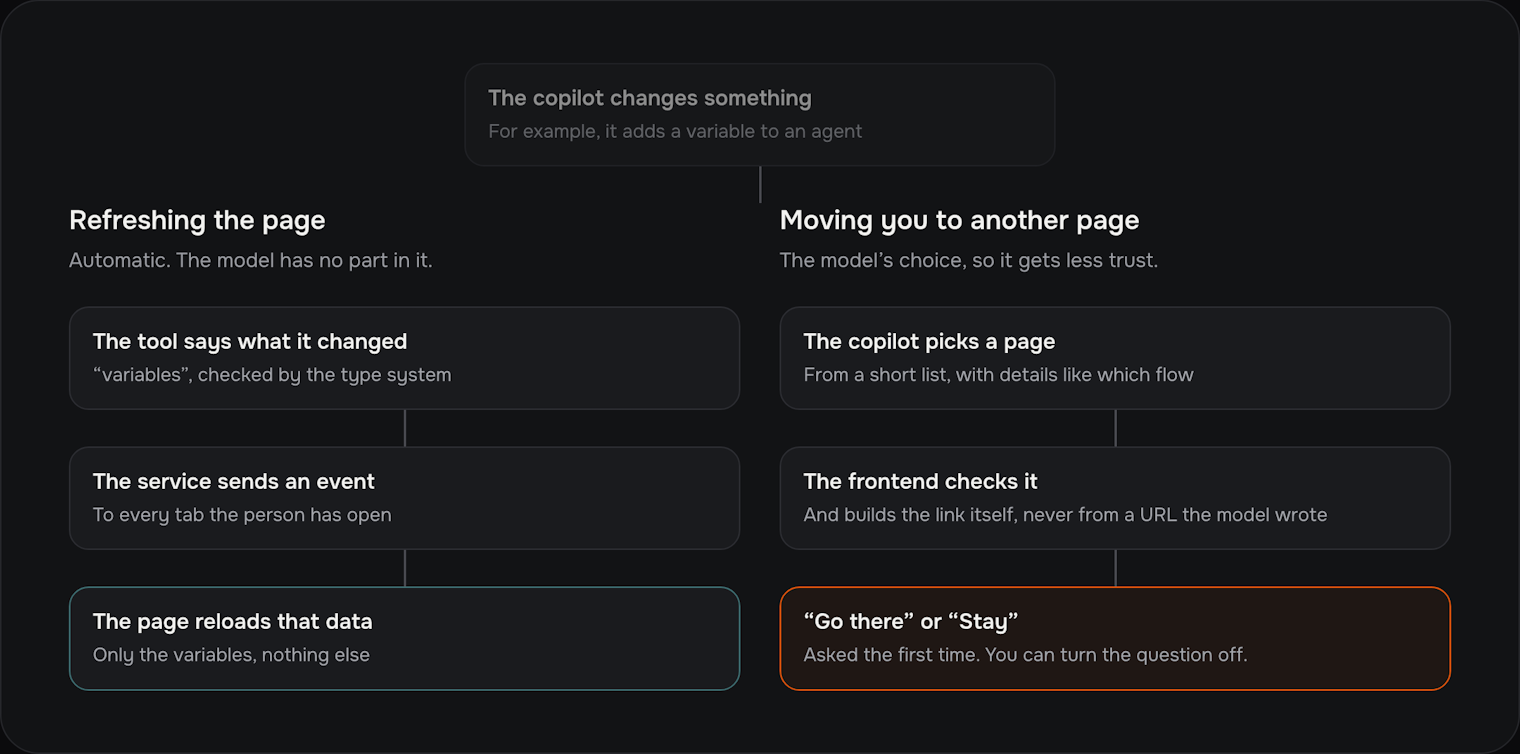
Early on, if the copilot added a variable, the variables page didn't show it until you refreshed. It looked like the copilot hadn't done anything. We fixed it with two separate mechanisms, because one is safe to automate and the other isn't.
Refreshing the page is automatic. Each tool declares what kind of thing it changes, like variables or flows. When the tool succeeds, the service tells the page to reload exactly that data, in every tab you have open. The model has no say in this, so it can't forget to do it.
Moving you to another page is the copilot's decision, so it gets less trust. It never sends a web address. It picks a page from a short list and fills in details like which flow, and the frontend checks those and builds the link itself.
To open a particular step in a flow or a filtered dashboard, the copilot uses the same links people already share with each other. That's also why every filter in Nexus now has to live in the URL. If it isn't in the URL, the copilot can't take you there.
The first time the copilot wants to move you, a small dialog names the page and asks "Go there" or "Stay". You can turn the question off, and that choice is saved to your account, so it follows you to other browsers. It only moves you by itself right after it has changed something for you. Otherwise it gives you a link.
The first version of the service had a router at the front. A small classifier read each request and passed it to one of about eleven specialist agents, for analytics, flows, the knowledge base, operations and so on. Each specialist had its own instructions and tools, and they could hand a conversation over to each other.
That held up for most of the year, but it got worse as Nexus grew. By the end, each specialist's instructions were between 8,000 and 38,000 tokens long. A request that touched two areas, like "build an agent and show me how it's doing", bounced between specialists and lost details on the way. Sending a request to the wrong specialist was the most common failure in our tests, and every new feature started with a debate about which specialist should own it.
In October 2026 we replaced the router with a single agent and turned each specialist into a skill. The agent starts with short instructions, about 3,800 tokens, and a tool for loading skills. When a request needs analytics, it loads the analytics skill, and from its next step it has that skill's instructions and tools.
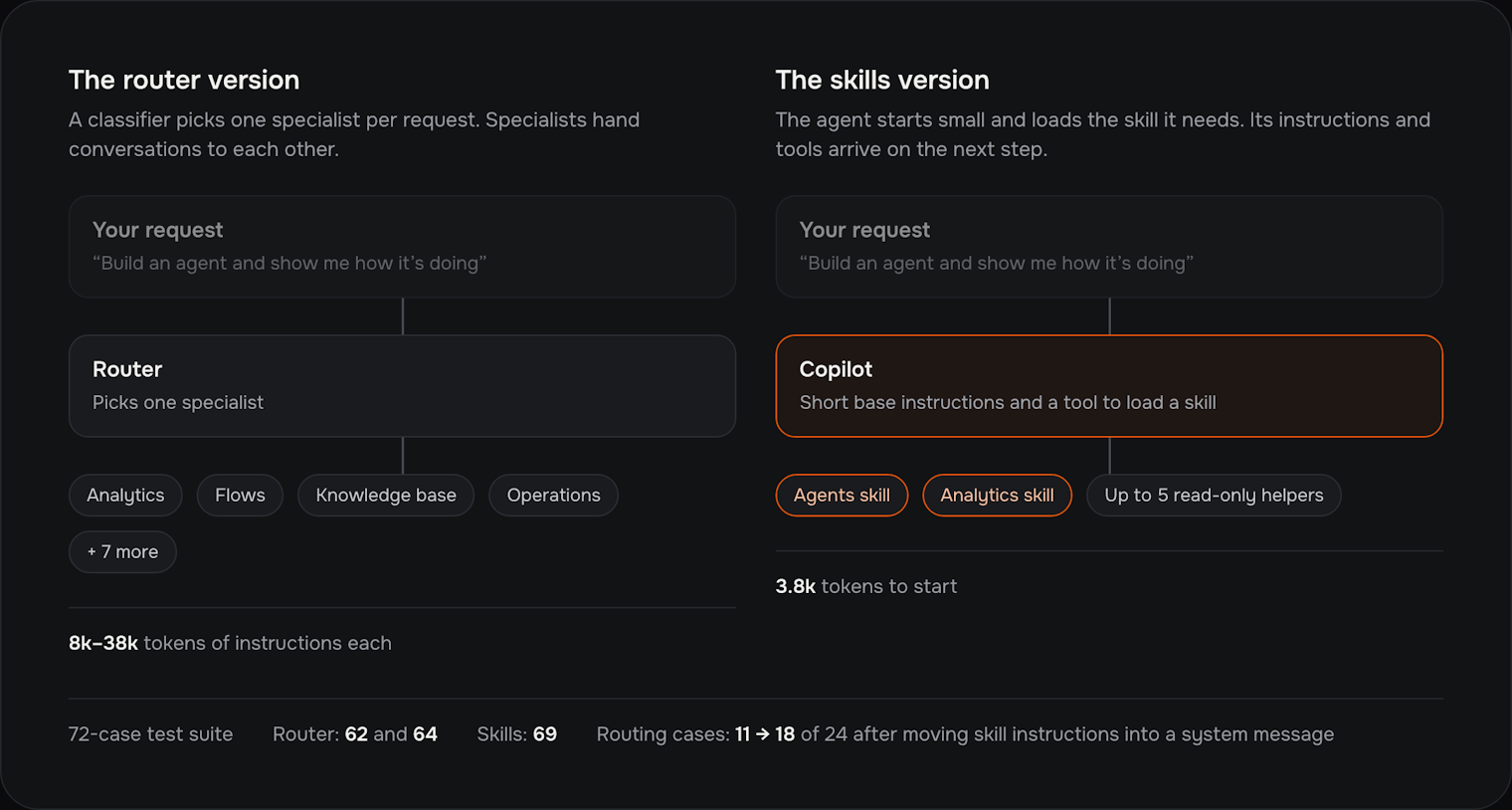
For research it can start up to five helpers in parallel. The helpers can only read, and they can't start helpers of their own.
We kept the format the frontend reads exactly the same, so we could move agents over one at a time and compare. On our suite of 72 end-to-end tests, the old version scored 62 and 64 across two runs, and the new one scored 69. It went live for every agent on 22 October.
The biggest single improvement came from a small change. Skill instructions used to arrive as the result of the loading tool. Moving them into a system message took the routing tests from 11 of 24 passing to 18 of 24.
Yellow.ai also has an MCP server, so outside AI tools can work with Nexus. The copilot and the MCP server each had their own copy of the same tools, and the copies drifted apart. A fix in one often never reached the other.
Now the copilot uses the MCP server's tools directly. The server runs in each region, so customer data stays in its region. Every call carries the signed-in person's session, which means the copilot can never do something the person asking couldn't do themselves. Any tool the server doesn't mark as read-only is treated as a write. It waits for a card, and it's refused on live agents.
Each agent has a monthly budget, checked before every model call. Each request has a limit on how many model calls it can make and how long each answer can be. Long conversations get summarised once they pass a certain length.
Prompt caching took the most work. At one point 80% of our spend went on rewriting the cache for one skill's tools, because loading a skill changed the tool list and threw away everything cached after it. We fixed it by sorting tools by name, only ever adding to the end of the prompt, and loading a skill's tools without touching the start. Now about two thirds of the input in our tests is read from the cache.
There are about 90 end-to-end test cases where another model grades the answers. They cover analytics questions, builds with many steps, and approvals. The service also has about 90 files of unit tests.
Two groups of tests mattered most. One checks that the new version sends the frontend exactly what the old one did, which is what made switching over safe. The other proves that no write can skip its approval card.
I'd have replaced the router six months earlier. We spent a long time tuning it when the router itself was the problem.
Automatic page refreshes are only verified for a couple of kinds of data. The flow canvas keeps its data somewhere else and still needs its own wiring. The kinds that aren't verified yet are listed in the code, so nobody assumes they work.
Approvals are being redesigned so every change waiting for you sits in one place above the message box, and you can answer them together. It's built but hasn't shipped yet.
The copilot is now the main way people build on Nexus. Most routines, interfaces and agent setups start as a draft from the copilot and then get edited by hand. The single-agent version is live for every agent, scores higher in our tests than the version it replaced, and costs less per conversation.
